How to integrate Freeradius with Oracle Database XE(18c)?

I have installed Freeradius and Oracle Database 18c XE. FreeRADIUS Version 3.0.20 -- it's working fine locally Oracle Database XE working fine. But I can not integrate Freeradius with Oracle Database. I need help regarding this How can I integrate Freeradius with oracle database. anyone can help? Thanks Nandi

Did you download the Oracle client for Linux and make sure that it was compiled in when you built the rlm_sql_oracle client? Oracle Linux Client: https://www.oracle.com/database/technologies/instant-client/linux-x86-64-dow... Then follow the instructions on building the rlm_sql_oracle module into FreeRadius https://wiki.freeradius.org/modules/Rlm_sql_oracle On Tue, Mar 31, 2020 at 11:08 AM Sajib Nandi <sajib.aece@gmail.com> wrote:
I have installed Freeradius and Oracle Database 18c XE. FreeRADIUS Version 3.0.20 -- it's working fine locally Oracle Database XE working fine. But I can not integrate Freeradius with Oracle Database. I need help regarding this How can I integrate Freeradius with oracle database. anyone can help?
Thanks Nandi - List info/subscribe/unsubscribe? See http://www.freeradius.org/list/users.html
Hi Peter,
I installed oracle-instantclient18.5
yum localinstall oracle-instantclient18.5-basic-18.5.0.0.0-3.x86_64.rpm
yum localinstall oracle-instantclient18.5-sqlplus-18.5.0.0.0-3.x86_64.rpm
yum localinstall oracle-instantclient18.5-devel-18.5.0.0.0-3.x86_64.rpm

The various packages installed into subdirectories of
/usr/lib/oracle
/usr/include/oracle and
/usr/share/oracle

I followed mentioned link for building the rlm_sql_oracl , I think this
instraction not fully clear, I used below command for building the
rlm_sql_oracle module intoFreeradius
#cd
/usr/local/freeradius-server-3.0.20/src/modules/rlm_sql/drivers/rlm_sql_oracle
#./configure --with-oracle-lib-dir=/usr/lib/oracle/18.5/client64/lib
--with-oracle-include-dir=/usr/include/oracle/18.5/client64
But make and make install command does not work
I see there is no Makefile

1. maybe  I was wrong with building the rlm_sql_oracle module
can you tell me how to build the rlm_sql_oracle module?


2. or I was wrong with oracle database connect:
vi /usr/local/etc/raddb/mods-available/sql
dialect = "oracle"
driver = "rlm_sql_${dialect}"
server = "radius/radius@113.21.228.14:1521/xepdb1"
radius_db =
"DESCRIPTION=(ADDRESS=(PROTOCOL=TCP)(HOST=113.21.228.14)(PORT=1521))(CONNECT_DATA=(SID=XE)))"

is this right?

when I go to debugging mode I got following Error
radiusd -X

---------cut-----------
  # Instantiating module "sql" from file
/usr/local/etc/raddb/mods-enabled/sql
rlm_sql (sql): Attempting to connect to database
"DESCRIPTION=(ADDRESS=(PROTOCOL=TCP)(HOST=113.21.228.14)(PORT=1521))(CONNECT_DATA=(SID=XE)))"
rlm_sql (sql): Initialising connection pool
   pool {
        start = 5
        min = 3
        max = 32
        spare = 10
        uses = 0
        lifetime = 0
        cleanup_interval = 30
        idle_timeout = 60
        retry_delay = 30
        spread = no
   }
rlm_sql (sql): Opening additional connection (0), 1 of 32 pending slots used
rlm_sql_oracle: Oracle logon failed: 'ORA-12154: TNS:could not resolve the
connect identifier specified '
rlm_sql (sql): Opening connection failed (0)
rlm_sql (sql): Removing connection pool
/usr/local/etc/raddb/mods-enabled/sql[27]: Instantiation failed for module
"sql"
------------------------------------------


Thanks
Nandi


On Tue, Mar 31, 2020 at 4:44 AM Peter Lambrechtsen <peter@crypt.nz> wrote:

> Did you download the Oracle client for Linux and make sure that it was
> compiled in when you built the rlm_sql_oracle client?
>
> Oracle Linux Client:
>
> https://www.oracle.com/database/technologies/instant-client/linux-x86-64-downloads.html
>
>
> Then follow the instructions on building the rlm_sql_oracle module into
> FreeRadius
>
> https://wiki.freeradius.org/modules/Rlm_sql_oracle
>
>
> On Tue, Mar 31, 2020 at 11:08 AM Sajib Nandi <sajib.aece@gmail.com> wrote:
>
> > I have installed Freeradius and Oracle Database 18c XE.
> > FreeRADIUS Version 3.0.20 -- it's working fine locally
> > Oracle Database XE working fine.
> > But I can not integrate Freeradius with Oracle Database.
> > I need help regarding this How can I integrate Freeradius with oracle
> > database.
> > anyone can help?
> >
> > Thanks
> > Nandi
> > -
> > List info/subscribe/unsubscribe? See
> > http://www.freeradius.org/list/users.html
> -
> List info/subscribe/unsubscribe? See
> http://www.freeradius.org/list/users.html

On Mar 31, 2020, at 1:20 AM, Sajib Nandi <sajib.aece@gmail.com> wrote:
I installed oracle-instantclient18.5 yum localinstall oracle-instantclient18.5-basic-18.5.0.0.0-3.x86_64.rpm yum localinstall oracle-instantclient18.5-sqlplus-18.5.0.0.0-3.x86_64.rpm yum localinstall oracle-instantclient18.5-devel-18.5.0.0.0-3.x86_64.rpm
The various packages installed into subdirectories of /usr/lib/oracle /usr/include/oracle and /usr/share/oracle
That's good.
I followed mentioned link for building the rlm_sql_oracl , I think this instraction not fully clear, I used below command for building the rlm_sql_oracle module intoFreeradius #cd /usr/local/freeradius-server-3.0.20/src/modules/rlm_sql/drivers/rlm_sql_oracle #./configure --with-oracle-lib-dir=/usr/lib/oracle/18.5/client64/lib --with-oracle-include-dir=/usr/include/oracle/18.5/client64 But make and make install command does not work I see there is no Makefile
There should be a file 'src/modules/rlm_sql/drivers/rlm_sql_oracle/all.mk You can edit this file directly if necessary.
1. maybe I was wrong with building the rlm_sql_oracle module can you tell me how to build the rlm_sql_oracle module?
That should work. And, see below...
2. or I was wrong with oracle database connect: vi /usr/local/etc/raddb/mods-available/sql dialect = "oracle" driver = "rlm_sql_${dialect}" server = "radius/radius@113.21.228.14:1521/xepdb1" radius_db = "DESCRIPTION=(ADDRESS=(PROTOCOL=TCP)(HOST=113.21.228.14)(PORT=1521))(CONNECT_DATA=(SID=XE)))"
is this right?
when I go to debugging mode I got following Error radiusd -X
---------cut----------- ... rlm_sql (sql): Opening additional connection (0), 1 of 32 pending slots used rlm_sql_oracle: Oracle logon failed: 'ORA-12154: TNS:could not resolve the connect identifier specified '
You build the rlm_sql_oracle module correctly. That's good. The issue now is Oracle. It doesn't like that "radius_db" string, *or* something else. It's hard to say, as we're not Oracle people. A quick google search yields this, which might help: https://community.oracle.com/thread/3510766?start=0&tstart=0 If it still fails after that, call Oracle. I presume you have support... Once rlm_sql_oracle is built and returning errors from Oracle, there's little more we can do. The errors come from Oracle, not from FreeRADIUS. Alan DeKok.
Thanks Alan Dekok for your replay. I am communicating with oracle expert. Thanks Nandi On Tue, Mar 31, 2020 at 6:32 PM Alan DeKok <aland@deployingradius.com> wrote:
On Mar 31, 2020, at 1:20 AM, Sajib Nandi <sajib.aece@gmail.com> wrote:
I installed oracle-instantclient18.5 yum localinstall oracle-instantclient18.5-basic-18.5.0.0.0-3.x86_64.rpm yum localinstall oracle-instantclient18.5-sqlplus-18.5.0.0.0-3.x86_64.rpm yum localinstall oracle-instantclient18.5-devel-18.5.0.0.0-3.x86_64.rpm
The various packages installed into subdirectories of /usr/lib/oracle /usr/include/oracle and /usr/share/oracle
That's good.
I followed mentioned link for building the rlm_sql_oracl , I think this instraction not fully clear, I used below command for building the rlm_sql_oracle module intoFreeradius #cd
/usr/local/freeradius-server-3.0.20/src/modules/rlm_sql/drivers/rlm_sql_oracle
#./configure --with-oracle-lib-dir=/usr/lib/oracle/18.5/client64/lib --with-oracle-include-dir=/usr/include/oracle/18.5/client64 But make and make install command does not work I see there is no Makefile
There should be a file 'src/modules/rlm_sql/drivers/rlm_sql_oracle/ all.mk
You can edit this file directly if necessary.
1. maybe I was wrong with building the rlm_sql_oracle module can you tell me how to build the rlm_sql_oracle module?
That should work. And, see below...
2. or I was wrong with oracle database connect: vi /usr/local/etc/raddb/mods-available/sql dialect = "oracle" driver = "rlm_sql_${dialect}" server = "radius/radius@113.21.228.14:1521/xepdb1" radius_db =
"DESCRIPTION=(ADDRESS=(PROTOCOL=TCP)(HOST=113.21.228.14)(PORT=1521))(CONNECT_DATA=(SID=XE)))"
is this right?
when I go to debugging mode I got following Error radiusd -X
---------cut----------- ... rlm_sql (sql): Opening additional connection (0), 1 of 32 pending slots
used
rlm_sql_oracle: Oracle logon failed: 'ORA-12154: TNS:could not resolve the connect identifier specified '
You build the rlm_sql_oracle module correctly. That's good.
The issue now is Oracle. It doesn't like that "radius_db" string, *or* something else. It's hard to say, as we're not Oracle people.
A quick google search yields this, which might help:
https://community.oracle.com/thread/3510766?start=0&tstart=0
If it still fails after that, call Oracle. I presume you have support...
Once rlm_sql_oracle is built and returning errors from Oracle, there's little more we can do. The errors come from Oracle, not from FreeRADIUS.
Alan DeKok.
- List info/subscribe/unsubscribe? See http://www.freeradius.org/list/users.html

Oracle guy here. Alan is exactly correct. The error you're getting is from Oracle (ORA12154) The error "could not resolve the connect identifier specified" means that the client doesn't know how to talk to the Oracle server, based on what you provided. Oracle actually has a facility, 'oerr', that comes on all (non-XE?) databases, helping with understanding and interpretation of Oracle error messages. Here's the output for ORA-12154: [oracle@miscr2 ~]$ oerr ora 12154 12154, 00000, "TNS:could not resolve the connect identifier specified" // *Cause: A connection to a database or other service was requested using // a connect identifier, and the connect identifier specified could not // be resolved into a connect descriptor using one of the naming methods // configured. For example, if the type of connect identifier used was a // net service name then the net service name could not be found in a // naming method repository, or the repository could not be // located or reached. // *Action: // - If you are using local naming (TNSNAMES.ORA file): // - Make sure that "TNSNAMES" is listed as one of the values of the // NAMES.DIRECTORY_PATH parameter in the Oracle Net profile // (SQLNET.ORA) // - Verify that a TNSNAMES.ORA file exists and is in the proper // directory and is accessible. // - Check that the net service name used as the connect identifier // exists in the TNSNAMES.ORA file. // - Make sure there are no syntax errors anywhere in the TNSNAMES.ORA // file. Look for unmatched parentheses or stray characters. Errors // in a TNSNAMES.ORA file may make it unusable. // - If you are using directory naming: // - Verify that "LDAP" is listed as one of the values of the // NAMES.DIRETORY_PATH parameter in the Oracle Net profile // (SQLNET.ORA). // - Verify that the LDAP directory server is up and that it is // accessible. // - Verify that the net service name or database name used as the // connect identifier is configured in the directory. // - Verify that the default context being used is correct by // specifying a fully qualified net service name or a full LDAP DN // as the connect identifier // - If you are using easy connect naming: // - Verify that "EZCONNECT" is listed as one of the values of the // NAMES.DIRETORY_PATH parameter in the Oracle Net profile // (SQLNET.ORA). // - Make sure the host, port and service name specified // are correct. // - Try enclosing the connect identifier in quote marks. // // See the Oracle Net Services Administrators Guide or the Oracle // operating system specific guide for more information on naming. In your case, it appears you're not using a TNSNAMES.ORA file or any kind of directory. You seem to just have specified the information directly: "DESCRIPTION=(ADDRESS=(PROTOCOL=TCP)(HOST=113.21.228.14)(PORT=1521))(CONNECT_DATA=(SID=XE)))" This says "There's a database running on the host identified by '113.21.228.14' and that host is running a listener process on port 1521. That listener needs to know how to connect to the SID (system identifier) named 'XE'." So, the error, ORA-12154, is saying that some or all of the info you have provided is incorrect. So, first, do you have radiusd and Oracle XE running on the same server? Different servers? If the server is the same, is 113.21.228.14 the IP address of said server? Make sure you can connect to 113.21.228.14 on port 1521. (Try 'telnet 113.21.228.14 1521'. What happens?) If you can't connect to that IP at that port, why not? If there a firewall problem? If the DB and FR are on two different hosts ,you will need to get communication between them working. If they are on the same host, try uing '127.0.0.1' instead of '112.21.228.14'. Hope that helps you on getting the connection working. -Mark On Tue, Mar 31, 2020 at 12:11 PM Sajib Nandi <sajib.aece@gmail.com> wrote:
Thanks Alan Dekok for your replay. I am communicating with oracle expert.
Thanks Nandi
On Tue, Mar 31, 2020 at 6:32 PM Alan DeKok <aland@deployingradius.com> wrote:
On Mar 31, 2020, at 1:20 AM, Sajib Nandi <sajib.aece@gmail.com> wrote:
I installed oracle-instantclient18.5 yum localinstall oracle-instantclient18.5-basic-18.5.0.0.0-3.x86_64.rpm yum localinstall oracle-instantclient18.5-sqlplus-18.5.0.0.0-3.x86_64.rpm yum localinstall oracle-instantclient18.5-devel-18.5.0.0.0-3.x86_64.rpm
The various packages installed into subdirectories of /usr/lib/oracle /usr/include/oracle and /usr/share/oracle
That's good.
I followed mentioned link for building the rlm_sql_oracl , I think this instraction not fully clear, I used below command for building the rlm_sql_oracle module intoFreeradius #cd
/usr/local/freeradius-server-3.0.20/src/modules/rlm_sql/drivers/rlm_sql_oracle
#./configure --with-oracle-lib-dir=/usr/lib/oracle/18.5/client64/lib --with-oracle-include-dir=/usr/include/oracle/18.5/client64 But make and make install command does not work I see there is no Makefile
There should be a file 'src/modules/rlm_sql/drivers/rlm_sql_oracle/ all.mk
You can edit this file directly if necessary.
1. maybe I was wrong with building the rlm_sql_oracle module can you tell me how to build the rlm_sql_oracle module?
That should work. And, see below...
2. or I was wrong with oracle database connect: vi /usr/local/etc/raddb/mods-available/sql dialect = "oracle" driver = "rlm_sql_${dialect}" server = "radius/radius@113.21.228.14:1521/xepdb1" radius_db =
is this right?
when I go to debugging mode I got following Error radiusd -X
---------cut----------- ... rlm_sql (sql): Opening additional connection (0), 1 of 32 pending slots
used
rlm_sql_oracle: Oracle logon failed: 'ORA-12154: TNS:could not resolve the connect identifier specified '
You build the rlm_sql_oracle module correctly. That's good.
The issue now is Oracle. It doesn't like that "radius_db" string, *or* something else. It's hard to say, as we're not Oracle people.
A quick google search yields this, which might help:
https://community.oracle.com/thread/3510766?start=0&tstart=0
If it still fails after that, call Oracle. I presume you have support...
Once rlm_sql_oracle is built and returning errors from Oracle, there's little more we can do. The errors come from Oracle, not from FreeRADIUS.
Alan DeKok.
- List info/subscribe/unsubscribe? See http://www.freeradius.org/list/users.html
"DESCRIPTION=(ADDRESS=(PROTOCOL=TCP)(HOST=113.21.228.14)(PORT=1521))(CONNECT_DATA=(SID=XE)))" - List info/subscribe/unsubscribe? See http://www.freeradius.org/list/users.html
I would think your connect information is wrong.

driver = "rlm_sql_${dialect}"
server = "radius/radius@113.21.228.14:1521/xepdb1"
radius_db =
"DESCRIPTION=(ADDRESS=(PROTOCOL=TCP)(HOST=113.21.228.14)(PORT=1521))(CONNECT_DATA=(SID=XE)))"

Should be more like

       server = "113.21.228.14"
       port = 1521
       login = "radius"
       password = "radius"
        # If you are using Oracle then use this instead
       radius_db =
"DESCRIPTION=(ADDRESS=(PROTOCOL=TCP)(HOST=113.21.228.14)(PORT=1521))(CONNECT_DATA=(SID=XE)))"

Is your Database SID "XE" or "XEPDB1" as your "server" looks wrong to me
and should only be an IP address rather than a thin connect URL. As for the
"radius" user it will use the default schema associated to that user.


On Wed, Apr 1, 2020 at 6:41 AM Mark J. Bobak <mark@bobak.net> wrote:

> Oracle guy here.
>
> Alan is exactly correct.  The error you're getting is from Oracle
> (ORA12154)
> The error "could not resolve the connect identifier specified" means that
> the client doesn't know how to talk to the Oracle server, based on what you
> provided.
>
> Oracle actually has a facility, 'oerr', that comes on all (non-XE?)
> databases, helping with understanding and interpretation of Oracle error
> messages.  Here's the output for ORA-12154:
> [oracle@miscr2 ~]$ oerr ora 12154
> 12154, 00000, "TNS:could not resolve the connect identifier specified"
> // *Cause:  A connection to a database or other service was requested using
> // a connect identifier, and the connect identifier specified could not
> // be resolved into a connect descriptor using one of the naming methods
> // configured. For example, if the type of connect identifier used was a
> // net service name then the net service name could not be found in a
> // naming method repository, or the repository could not be
> // located or reached.
> // *Action:
> //   - If you are using local naming (TNSNAMES.ORA file):
> //      - Make sure that "TNSNAMES" is listed as one of the values of the
> //        NAMES.DIRECTORY_PATH parameter in the Oracle Net profile
> //        (SQLNET.ORA)
> //      - Verify that a TNSNAMES.ORA file exists and is in the proper
> //        directory and is accessible.
> //      - Check that the net service name used as the connect identifier
> //        exists in the TNSNAMES.ORA file.
> //      - Make sure there are no syntax errors anywhere in the TNSNAMES.ORA
> //        file.  Look for unmatched parentheses or stray characters. Errors
> //        in a TNSNAMES.ORA file may make it unusable.
> //   - If you are using directory naming:
> //      - Verify that "LDAP" is listed as one of the values of the
> //        NAMES.DIRETORY_PATH parameter in the Oracle Net profile
> //        (SQLNET.ORA).
> //      - Verify that the LDAP directory server is up and that it is
> //        accessible.
> //      - Verify that the net service name or database name used as the
> //        connect identifier is configured in the directory.
> //      - Verify that the default context being used is correct by
> //        specifying a fully qualified net service name or a full LDAP DN
> //        as the connect identifier
> //   - If you are using easy connect naming:
> //      - Verify that "EZCONNECT" is listed as one of the values of the
> //        NAMES.DIRETORY_PATH parameter in the Oracle Net profile
> //        (SQLNET.ORA).
> //      - Make sure the host, port and service name specified
> //        are correct.
> //      - Try enclosing the connect identifier in quote marks.
> //
> //   See the Oracle Net Services Administrators Guide or the Oracle
> //   operating system specific guide for more information on naming.
>
> In your case, it appears you're not using a TNSNAMES.ORA file or any kind
> of directory.  You seem to just have specified the information directly:
>
> "DESCRIPTION=(ADDRESS=(PROTOCOL=TCP)(HOST=113.21.228.14)(PORT=1521))(CONNECT_DATA=(SID=XE)))"
>
> This says "There's a database running on the host identified by
> '113.21.228.14' and that host is running a listener process on port 1521.
> That listener needs to know how to connect to the SID (system identifier)
> named 'XE'."
>
> So, the error, ORA-12154, is saying that some or all of the info you have
> provided is incorrect.  So, first, do you have radiusd and Oracle XE
> running on the same server?  Different servers?  If the server is the same,
> is 113.21.228.14 the IP address of said server?  Make sure you can connect
> to 113.21.228.14 on port 1521.  (Try 'telnet 113.21.228.14 1521'.  What
> happens?)  If you can't connect to that IP at that port, why not?  If there
> a firewall problem?  If the DB and FR are on two different hosts ,you will
> need to get communication between them working.  If they are on the same
> host, try uing '127.0.0.1' instead of '112.21.228.14'.
>
> Hope that helps you on getting the connection working.
>
> -Mark
>
> On Tue, Mar 31, 2020 at 12:11 PM Sajib Nandi <sajib.aece@gmail.com> wrote:
>
> > Thanks Alan Dekok for your replay.
> > I am communicating with oracle expert.
> >
> > Thanks
> > Nandi
> >
> >
> > On Tue, Mar 31, 2020 at 6:32 PM Alan DeKok <aland@deployingradius.com>
> > wrote:
> >
> > > On Mar 31, 2020, at 1:20 AM, Sajib Nandi <sajib.aece@gmail.com> wrote:
> > > > I installed oracle-instantclient18.5
> > > > yum localinstall
> oracle-instantclient18.5-basic-18.5.0.0.0-3.x86_64.rpm
> > > > yum localinstall
> > oracle-instantclient18.5-sqlplus-18.5.0.0.0-3.x86_64.rpm
> > > > yum localinstall
> oracle-instantclient18.5-devel-18.5.0.0.0-3.x86_64.rpm
> > > >
> > > > The various packages installed into subdirectories of
> > > > /usr/lib/oracle
> > > > /usr/include/oracle and
> > > > /usr/share/oracle
> > >
> > >   That's good.
> > >
> > > > I followed mentioned link for building the rlm_sql_oracl , I think
> this
> > > > instraction not fully clear, I used below command for building the
> > > > rlm_sql_oracle module intoFreeradius
> > > > #cd
> > > >
> > >
> >
> /usr/local/freeradius-server-3.0.20/src/modules/rlm_sql/drivers/rlm_sql_oracle
> > > > #./configure --with-oracle-lib-dir=/usr/lib/oracle/18.5/client64/lib
> > > > --with-oracle-include-dir=/usr/include/oracle/18.5/client64
> > > > But make and make install command does not work
> > > > I see there is no Makefile
> > >
> > >   There should be a file 'src/modules/rlm_sql/drivers/rlm_sql_oracle/
> > > all.mk
> > >
> > >   You can edit this file directly if necessary.
> > >
> > > > 1. maybe  I was wrong with building the rlm_sql_oracle module
> > > > can you tell me how to build the rlm_sql_oracle module?
> > >
> > >   That should work.  And, see below...
> > >
> > > > 2. or I was wrong with oracle database connect:
> > > > vi /usr/local/etc/raddb/mods-available/sql
> > > > dialect = "oracle"
> > > > driver = "rlm_sql_${dialect}"
> > > > server = "radius/radius@113.21.228.14:1521/xepdb1"
> > > > radius_db =
> > > >
> > >
> >
> "DESCRIPTION=(ADDRESS=(PROTOCOL=TCP)(HOST=113.21.228.14)(PORT=1521))(CONNECT_DATA=(SID=XE)))"
> > > >
> > > > is this right?
> > > >
> > > > when I go to debugging mode I got following Error
> > > > radiusd -X
> > > >
> > > > ---------cut-----------
> > > > ...
> > > > rlm_sql (sql): Opening additional connection (0), 1 of 32 pending
> slots
> > > used
> > > > rlm_sql_oracle: Oracle logon failed: 'ORA-12154: TNS:could not
> resolve
> > > the
> > > > connect identifier specified '
> > >
> > >   You build the rlm_sql_oracle module correctly.  That's good.
> > >
> > >   The issue now is Oracle.  It doesn't like that "radius_db" string,
> *or*
> > > something else.  It's hard to say, as we're not Oracle people.
> > >
> > >   A quick google search yields this, which might help:
> > >
> > > https://community.oracle.com/thread/3510766?start=0&tstart=0
> > >
> > >   If it still fails after that, call Oracle.  I presume you have
> > support...
> > >
> > >   Once rlm_sql_oracle is built and returning errors from Oracle,
> there's
> > > little more we can do.  The errors come from Oracle, not from
> FreeRADIUS.
> > >
> > >   Alan DeKok.
> > >
> > >
> > > -
> > > List info/subscribe/unsubscribe? See
> > > http://www.freeradius.org/list/users.html
> > -
> > List info/subscribe/unsubscribe? See
> > http://www.freeradius.org/list/users.html
> -
> List info/subscribe/unsubscribe? See
> http://www.freeradius.org/list/users.html
Hi Mark,
Thanks for the clarification.
you can check by connecting also .. this is test environment on Oracle
database18c XE
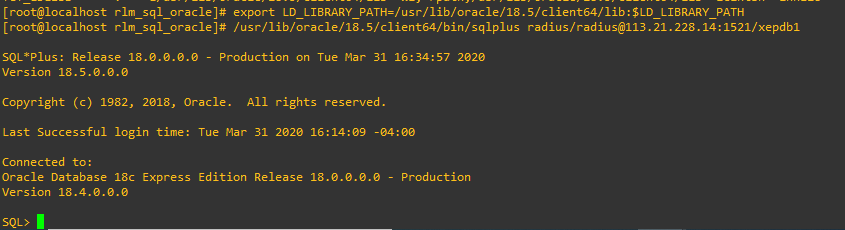
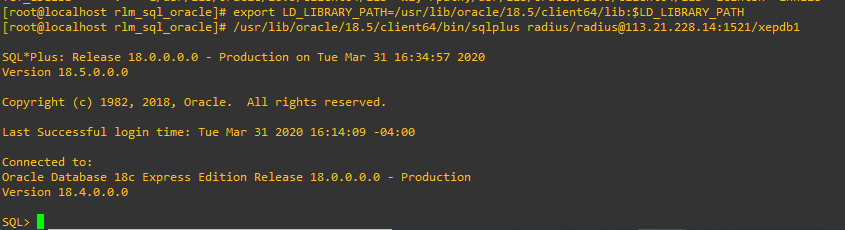
>sqlplus radius/radius@113.21.228.14:1521/xepdb1

My Freeradius and oracle databases are on different servers.
Freeradius: 103.40.226.34
Oracle: 113.21.228.14

I am installing Oracle instant Client on Freeradius(103.40.226.34)
after that I checked oracle database connected from Freeradius serverby
below command:
First given command: export
LD_LIBRARY_PATH=/usr/lib/oracle/18.5/client64/lib:$LD_LIBRARY_PATH
Second : /usr/lib/oracle/18.5/client64/bin/sqlplus radius/
radius@113.21.228.14:1521/xepdb1
[image: image.png]

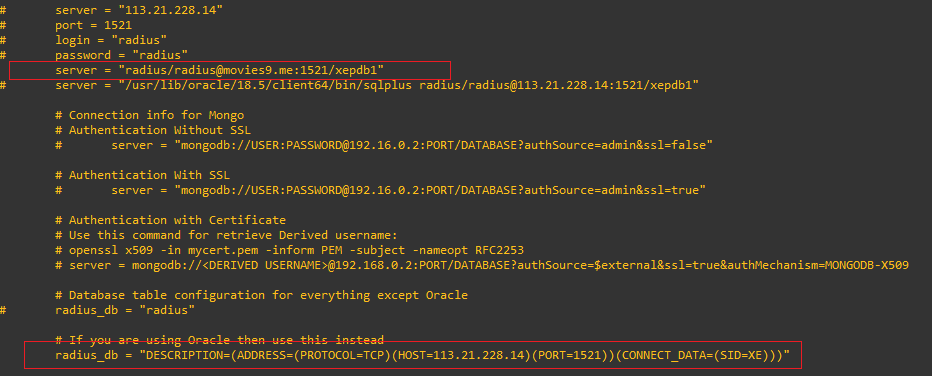
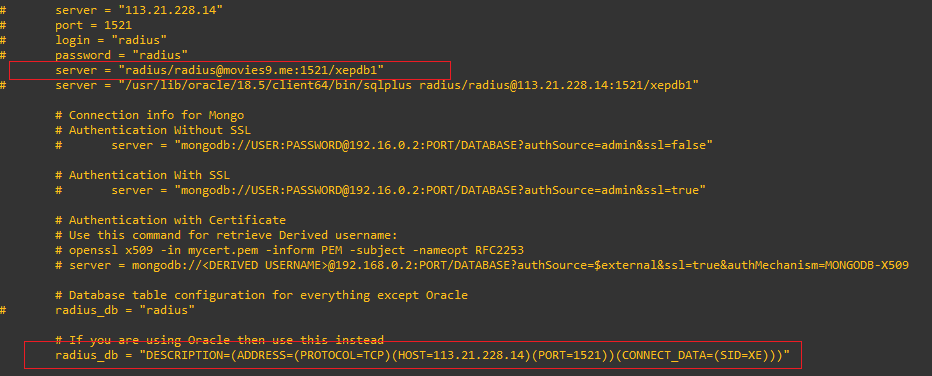
vi /usr/local/etc/raddb/mods-available/sql
please check is this configuration correct?
[image: image.png]

1. can you tell me Oracle database 18c is supported Freeradius?
because oracle 18c database has a container database and plugable database,
but this concept had not in database 11g . I used xepdb1


2. can you tell me how to connect oracle database with oracle instantclient

Thanks
Nandi

On Tue, Mar 31, 2020 at 11:41 PM Mark J. Bobak <mark@bobak.net> wrote:

> Oracle guy here.
>
> Alan is exactly correct.  The error you're getting is from Oracle
> (ORA12154)
> The error "could not resolve the connect identifier specified" means that
> the client doesn't know how to talk to the Oracle server, based on what you
> provided.
>
> Oracle actually has a facility, 'oerr', that comes on all (non-XE?)
> databases, helping with understanding and interpretation of Oracle error
> messages.  Here's the output for ORA-12154:
> [oracle@miscr2 ~]$ oerr ora 12154
> 12154, 00000, "TNS:could not resolve the connect identifier specified"
> // *Cause:  A connection to a database or other service was requested using
> // a connect identifier, and the connect identifier specified could not
> // be resolved into a connect descriptor using one of the naming methods
> // configured. For example, if the type of connect identifier used was a
> // net service name then the net service name could not be found in a
> // naming method repository, or the repository could not be
> // located or reached.
> // *Action:
> //   - If you are using local naming (TNSNAMES.ORA file):
> //      - Make sure that "TNSNAMES" is listed as one of the values of the
> //        NAMES.DIRECTORY_PATH parameter in the Oracle Net profile
> //        (SQLNET.ORA)
> //      - Verify that a TNSNAMES.ORA file exists and is in the proper
> //        directory and is accessible.
> //      - Check that the net service name used as the connect identifier
> //        exists in the TNSNAMES.ORA file.
> //      - Make sure there are no syntax errors anywhere in the TNSNAMES.ORA
> //        file.  Look for unmatched parentheses or stray characters. Errors
> //        in a TNSNAMES.ORA file may make it unusable.
> //   - If you are using directory naming:
> //      - Verify that "LDAP" is listed as one of the values of the
> //        NAMES.DIRETORY_PATH parameter in the Oracle Net profile
> //        (SQLNET.ORA).
> //      - Verify that the LDAP directory server is up and that it is
> //        accessible.
> //      - Verify that the net service name or database name used as the
> //        connect identifier is configured in the directory.
> //      - Verify that the default context being used is correct by
> //        specifying a fully qualified net service name or a full LDAP DN
> //        as the connect identifier
> //   - If you are using easy connect naming:
> //      - Verify that "EZCONNECT" is listed as one of the values of the
> //        NAMES.DIRETORY_PATH parameter in the Oracle Net profile
> //        (SQLNET.ORA).
> //      - Make sure the host, port and service name specified
> //        are correct.
> //      - Try enclosing the connect identifier in quote marks.
> //
> //   See the Oracle Net Services Administrators Guide or the Oracle
> //   operating system specific guide for more information on naming.
>
> In your case, it appears you're not using a TNSNAMES.ORA file or any kind
> of directory.  You seem to just have specified the information directly:
>
> "DESCRIPTION=(ADDRESS=(PROTOCOL=TCP)(HOST=113.21.228.14)(PORT=1521))(CONNECT_DATA=(SID=XE)))"
>
> This says "There's a database running on the host identified by
> '113.21.228.14' and that host is running a listener process on port 1521.
> That listener needs to know how to connect to the SID (system identifier)
> named 'XE'."
>
> So, the error, ORA-12154, is saying that some or all of the info you have
> provided is incorrect.  So, first, do you have radiusd and Oracle XE
> running on the same server?  Different servers?  If the server is the same,
> is 113.21.228.14 the IP address of said server?  Make sure you can connect
> to 113.21.228.14 on port 1521.  (Try 'telnet 113.21.228.14 1521'.  What
> happens?)  If you can't connect to that IP at that port, why not?  If there
> a firewall problem?  If the DB and FR are on two different hosts ,you will
> need to get communication between them working.  If they are on the same
> host, try uing '127.0.0.1' instead of '112.21.228.14'.
>
> Hope that helps you on getting the connection working.
>
> -Mark
>
> On Tue, Mar 31, 2020 at 12:11 PM Sajib Nandi <sajib.aece@gmail.com> wrote:
>
> > Thanks Alan Dekok for your replay.
> > I am communicating with oracle expert.
> >
> > Thanks
> > Nandi
> >
> >
> > On Tue, Mar 31, 2020 at 6:32 PM Alan DeKok <aland@deployingradius.com>
> > wrote:
> >
> > > On Mar 31, 2020, at 1:20 AM, Sajib Nandi <sajib.aece@gmail.com> wrote:
> > > > I installed oracle-instantclient18.5
> > > > yum localinstall
> oracle-instantclient18.5-basic-18.5.0.0.0-3.x86_64.rpm
> > > > yum localinstall
> > oracle-instantclient18.5-sqlplus-18.5.0.0.0-3.x86_64.rpm
> > > > yum localinstall
> oracle-instantclient18.5-devel-18.5.0.0.0-3.x86_64.rpm
> > > >
> > > > The various packages installed into subdirectories of
> > > > /usr/lib/oracle
> > > > /usr/include/oracle and
> > > > /usr/share/oracle
> > >
> > >   That's good.
> > >
> > > > I followed mentioned link for building the rlm_sql_oracl , I think
> this
> > > > instraction not fully clear, I used below command for building the
> > > > rlm_sql_oracle module intoFreeradius
> > > > #cd
> > > >
> > >
> >
> /usr/local/freeradius-server-3.0.20/src/modules/rlm_sql/drivers/rlm_sql_oracle
> > > > #./configure --with-oracle-lib-dir=/usr/lib/oracle/18.5/client64/lib
> > > > --with-oracle-include-dir=/usr/include/oracle/18.5/client64
> > > > But make and make install command does not work
> > > > I see there is no Makefile
> > >
> > >   There should be a file 'src/modules/rlm_sql/drivers/rlm_sql_oracle/
> > > all.mk
> > >
> > >   You can edit this file directly if necessary.
> > >
> > > > 1. maybe  I was wrong with building the rlm_sql_oracle module
> > > > can you tell me how to build the rlm_sql_oracle module?
> > >
> > >   That should work.  And, see below...
> > >
> > > > 2. or I was wrong with oracle database connect:
> > > > vi /usr/local/etc/raddb/mods-available/sql
> > > > dialect = "oracle"
> > > > driver = "rlm_sql_${dialect}"
> > > > server = "radius/radius@113.21.228.14:1521/xepdb1"
> > > > radius_db =
> > > >
> > >
> >
> "DESCRIPTION=(ADDRESS=(PROTOCOL=TCP)(HOST=113.21.228.14)(PORT=1521))(CONNECT_DATA=(SID=XE)))"
> > > >
> > > > is this right?
> > > >
> > > > when I go to debugging mode I got following Error
> > > > radiusd -X
> > > >
> > > > ---------cut-----------
> > > > ...
> > > > rlm_sql (sql): Opening additional connection (0), 1 of 32 pending
> slots
> > > used
> > > > rlm_sql_oracle: Oracle logon failed: 'ORA-12154: TNS:could not
> resolve
> > > the
> > > > connect identifier specified '
> > >
> > >   You build the rlm_sql_oracle module correctly.  That's good.
> > >
> > >   The issue now is Oracle.  It doesn't like that "radius_db" string,
> *or*
> > > something else.  It's hard to say, as we're not Oracle people.
> > >
> > >   A quick google search yields this, which might help:
> > >
> > > https://community.oracle.com/thread/3510766?start=0&tstart=0
> > >
> > >   If it still fails after that, call Oracle.  I presume you have
> > support...
> > >
> > >   Once rlm_sql_oracle is built and returning errors from Oracle,
> there's
> > > little more we can do.  The errors come from Oracle, not from
> FreeRADIUS.
> > >
> > >   Alan DeKok.
> > >
> > >
> > > -
> > > List info/subscribe/unsubscribe? See
> > > http://www.freeradius.org/list/users.html
> > -
> > List info/subscribe/unsubscribe? See
> > http://www.freeradius.org/list/users.html
> -
> List info/subscribe/unsubscribe? See
> http://www.freeradius.org/list/users.html
Dear all,
Finally, I have done successfully integrated Freeradius with Oracle
Database.
Special thanks to Mark, Alen & Peter

Thanks
Nandi


On Wed, Apr 1, 2020 at 2:53 AM Sajib Nandi <sajib.aece@gmail.com> wrote:

> Hi Mark,
> Thanks for the clarification.
> you can check by connecting also .. this is test environment on Oracle
> database18c XE
> >sqlplus radius/radius@113.21.228.14:1521/xepdb1
>
> My Freeradius and oracle databases are on different servers.
> Freeradius: 103.40.226.34
> Oracle: 113.21.228.14
>
> I am installing Oracle instant Client on Freeradius(103.40.226.34)
> after that I checked oracle database connected from Freeradius serverby
> below command:
> First given command: export
> LD_LIBRARY_PATH=/usr/lib/oracle/18.5/client64/lib:$LD_LIBRARY_PATH
> Second : /usr/lib/oracle/18.5/client64/bin/sqlplus radius/
> radius@113.21.228.14:1521/xepdb1
> [image: image.png]
>
> vi /usr/local/etc/raddb/mods-available/sql
> please check is this configuration correct?
> [image: image.png]
>
> 1. can you tell me Oracle database 18c is supported Freeradius?
> because oracle 18c database has a container database and plugable
> database, but this concept had not in database 11g . I used xepdb1
>
>
> 2. can you tell me how to connect oracle database with oracle
> instantclient
>
> Thanks
> Nandi
>
> On Tue, Mar 31, 2020 at 11:41 PM Mark J. Bobak <mark@bobak.net> wrote:
>
>> Oracle guy here.
>>
>> Alan is exactly correct.  The error you're getting is from Oracle
>> (ORA12154)
>> The error "could not resolve the connect identifier specified" means that
>> the client doesn't know how to talk to the Oracle server, based on what
>> you
>> provided.
>>
>> Oracle actually has a facility, 'oerr', that comes on all (non-XE?)
>> databases, helping with understanding and interpretation of Oracle error
>> messages.  Here's the output for ORA-12154:
>> [oracle@miscr2 ~]$ oerr ora 12154
>> 12154, 00000, "TNS:could not resolve the connect identifier specified"
>> // *Cause:  A connection to a database or other service was requested
>> using
>> // a connect identifier, and the connect identifier specified could not
>> // be resolved into a connect descriptor using one of the naming methods
>> // configured. For example, if the type of connect identifier used was a
>> // net service name then the net service name could not be found in a
>> // naming method repository, or the repository could not be
>> // located or reached.
>> // *Action:
>> //   - If you are using local naming (TNSNAMES.ORA file):
>> //      - Make sure that "TNSNAMES" is listed as one of the values of the
>> //        NAMES.DIRECTORY_PATH parameter in the Oracle Net profile
>> //        (SQLNET.ORA)
>> //      - Verify that a TNSNAMES.ORA file exists and is in the proper
>> //        directory and is accessible.
>> //      - Check that the net service name used as the connect identifier
>> //        exists in the TNSNAMES.ORA file.
>> //      - Make sure there are no syntax errors anywhere in the
>> TNSNAMES.ORA
>> //        file.  Look for unmatched parentheses or stray characters.
>> Errors
>> //        in a TNSNAMES.ORA file may make it unusable.
>> //   - If you are using directory naming:
>> //      - Verify that "LDAP" is listed as one of the values of the
>> //        NAMES.DIRETORY_PATH parameter in the Oracle Net profile
>> //        (SQLNET.ORA).
>> //      - Verify that the LDAP directory server is up and that it is
>> //        accessible.
>> //      - Verify that the net service name or database name used as the
>> //        connect identifier is configured in the directory.
>> //      - Verify that the default context being used is correct by
>> //        specifying a fully qualified net service name or a full LDAP DN
>> //        as the connect identifier
>> //   - If you are using easy connect naming:
>> //      - Verify that "EZCONNECT" is listed as one of the values of the
>> //        NAMES.DIRETORY_PATH parameter in the Oracle Net profile
>> //        (SQLNET.ORA).
>> //      - Make sure the host, port and service name specified
>> //        are correct.
>> //      - Try enclosing the connect identifier in quote marks.
>> //
>> //   See the Oracle Net Services Administrators Guide or the Oracle
>> //   operating system specific guide for more information on naming.
>>
>> In your case, it appears you're not using a TNSNAMES.ORA file or any kind
>> of directory.  You seem to just have specified the information directly:
>>
>> "DESCRIPTION=(ADDRESS=(PROTOCOL=TCP)(HOST=113.21.228.14)(PORT=1521))(CONNECT_DATA=(SID=XE)))"
>>
>> This says "There's a database running on the host identified by
>> '113.21.228.14' and that host is running a listener process on port 1521.
>> That listener needs to know how to connect to the SID (system identifier)
>> named 'XE'."
>>
>> So, the error, ORA-12154, is saying that some or all of the info you have
>> provided is incorrect.  So, first, do you have radiusd and Oracle XE
>> running on the same server?  Different servers?  If the server is the
>> same,
>> is 113.21.228.14 the IP address of said server?  Make sure you can connect
>> to 113.21.228.14 on port 1521.  (Try 'telnet 113.21.228.14 1521'.  What
>> happens?)  If you can't connect to that IP at that port, why not?  If
>> there
>> a firewall problem?  If the DB and FR are on two different hosts ,you will
>> need to get communication between them working.  If they are on the same
>> host, try uing '127.0.0.1' instead of '112.21.228.14'.
>>
>> Hope that helps you on getting the connection working.
>>
>> -Mark
>>
>> On Tue, Mar 31, 2020 at 12:11 PM Sajib Nandi <sajib.aece@gmail.com>
>> wrote:
>>
>> > Thanks Alan Dekok for your replay.
>> > I am communicating with oracle expert.
>> >
>> > Thanks
>> > Nandi
>> >
>> >
>> > On Tue, Mar 31, 2020 at 6:32 PM Alan DeKok <aland@deployingradius.com>
>> > wrote:
>> >
>> > > On Mar 31, 2020, at 1:20 AM, Sajib Nandi <sajib.aece@gmail.com>
>> wrote:
>> > > > I installed oracle-instantclient18.5
>> > > > yum localinstall
>> oracle-instantclient18.5-basic-18.5.0.0.0-3.x86_64.rpm
>> > > > yum localinstall
>> > oracle-instantclient18.5-sqlplus-18.5.0.0.0-3.x86_64.rpm
>> > > > yum localinstall
>> oracle-instantclient18.5-devel-18.5.0.0.0-3.x86_64.rpm
>> > > >
>> > > > The various packages installed into subdirectories of
>> > > > /usr/lib/oracle
>> > > > /usr/include/oracle and
>> > > > /usr/share/oracle
>> > >
>> > >   That's good.
>> > >
>> > > > I followed mentioned link for building the rlm_sql_oracl , I think
>> this
>> > > > instraction not fully clear, I used below command for building the
>> > > > rlm_sql_oracle module intoFreeradius
>> > > > #cd
>> > > >
>> > >
>> >
>> /usr/local/freeradius-server-3.0.20/src/modules/rlm_sql/drivers/rlm_sql_oracle
>> > > > #./configure --with-oracle-lib-dir=/usr/lib/oracle/18.5/client64/lib
>> > > > --with-oracle-include-dir=/usr/include/oracle/18.5/client64
>> > > > But make and make install command does not work
>> > > > I see there is no Makefile
>> > >
>> > >   There should be a file 'src/modules/rlm_sql/drivers/rlm_sql_oracle/
>> > > all.mk
>> > >
>> > >   You can edit this file directly if necessary.
>> > >
>> > > > 1. maybe  I was wrong with building the rlm_sql_oracle module
>> > > > can you tell me how to build the rlm_sql_oracle module?
>> > >
>> > >   That should work.  And, see below...
>> > >
>> > > > 2. or I was wrong with oracle database connect:
>> > > > vi /usr/local/etc/raddb/mods-available/sql
>> > > > dialect = "oracle"
>> > > > driver = "rlm_sql_${dialect}"
>> > > > server = "radius/radius@113.21.228.14:1521/xepdb1"
>> > > > radius_db =
>> > > >
>> > >
>> >
>> "DESCRIPTION=(ADDRESS=(PROTOCOL=TCP)(HOST=113.21.228.14)(PORT=1521))(CONNECT_DATA=(SID=XE)))"
>> > > >
>> > > > is this right?
>> > > >
>> > > > when I go to debugging mode I got following Error
>> > > > radiusd -X
>> > > >
>> > > > ---------cut-----------
>> > > > ...
>> > > > rlm_sql (sql): Opening additional connection (0), 1 of 32 pending
>> slots
>> > > used
>> > > > rlm_sql_oracle: Oracle logon failed: 'ORA-12154: TNS:could not
>> resolve
>> > > the
>> > > > connect identifier specified '
>> > >
>> > >   You build the rlm_sql_oracle module correctly.  That's good.
>> > >
>> > >   The issue now is Oracle.  It doesn't like that "radius_db" string,
>> *or*
>> > > something else.  It's hard to say, as we're not Oracle people.
>> > >
>> > >   A quick google search yields this, which might help:
>> > >
>> > > https://community.oracle.com/thread/3510766?start=0&tstart=0
>> > >
>> > >   If it still fails after that, call Oracle.  I presume you have
>> > support...
>> > >
>> > >   Once rlm_sql_oracle is built and returning errors from Oracle,
>> there's
>> > > little more we can do.  The errors come from Oracle, not from
>> FreeRADIUS.
>> > >
>> > >   Alan DeKok.
>> > >
>> > >
>> > > -
>> > > List info/subscribe/unsubscribe? See
>> > > http://www.freeradius.org/list/users.html
>> > -
>> > List info/subscribe/unsubscribe? See
>> > http://www.freeradius.org/list/users.html
>> -
>> List info/subscribe/unsubscribe? See
>> http://www.freeradius.org/list/users.html
>
>

Hello, I didn't follow the entire thread, but I believe it would be nice if you could share whatever was the final showstopper in case that wasn't already mentioned. I feel like everyone would benefit from that, now and in the future. Best regards, Marki On 4/2/2020 11:08 PM, Sajib Nandi wrote:
Dear all, Finally, I have done successfully integrated Freeradius with Oracle Database.
participants (5)
-
 Alan DeKok
 -
 Mark J. Bobak
 -
 Marki
Marki -
 Peter Lambrechtsen
 -
 Sajib Nandi