
Hi Team, We are in the process of migrating from radiator to freeradius. I have a test freeradius server built on Ubuntu. When I am authenticating locally, radtest is successful. I added a wireless controller client and when I try to connect to the wifi using that client and freeradius authentication, it keeps failing. I see requests from the client to freeradius server but no response from freeradius. Below are the logs for reference: a2:01:00:00:01:70 > 00:50:56:a2:64:59, IPv4, length 336: WIRELESS_IP.32778
RADIUS_IP.1812: UDP, length 294 There's no response from the radius server.
Below are the firewall rules: nft add rule ip filter input udp dport 1812 counter accept nft add rule ip filter input udp dport 1813 counter accept Please let me know if you need any further information. Thanks. Regards, Deepansha Gaur

Please post full logs as requested in the documentation. We have no idea what's going on now. Op do 30 nov. 2023 17:51 schreef Deepansha Gaur <dgaur@ualberta.ca>:
Hi Team,
We are in the process of migrating from radiator to freeradius. I have a test freeradius server built on Ubuntu. When I am authenticating locally, radtest is successful. I added a wireless controller client and when I try to connect to the wifi using that client and freeradius authentication, it keeps failing. I see requests from the client to freeradius server but no response from freeradius. Below are the logs for reference: a2:01:00:00:01:70 > 00:50:56:a2:64:59, IPv4, length 336: WIRELESS_IP.32778
RADIUS_IP.1812: UDP, length 294 There's no response from the radius server.
Below are the firewall rules: nft add rule ip filter input udp dport 1812 counter accept nft add rule ip filter input udp dport 1813 counter accept
Please let me know if you need any further information. Thanks.
Regards, Deepansha Gaur - List info/subscribe/unsubscribe? See http://www.freeradius.org/list/users.html
Hi Mathias, Could you please confirm what logs do you need? Below are the radsniff and tcpdump outputs. root@test-freeradius:/home/dgaur# radsniff -i ens160 2023-11-30 10:07:07.548759 (1) Access-Request Id 67 ens160: 172.20.252.242:32778 -> 142.244.0.47:1812 +0.000 2023-11-30 10:07:12.748759 (1) ** norsp ** Access-Request Id 67 ens160: 172.20.252.242:32778 -> 142.244.0.47:1812 2023-11-30 10:07:17.567318 (2) Access-Request Id 68 ens160: 172.20.252.242:32778 -> 142.244.0.47:1812 +10.018 2023-11-30 10:07:22.767318 (2) ** norsp ** Access-Request Id 68 ens160: 172.20.252.242:32778 -> 142.244.0.47:1812 root@test-freeradius:/home/dgaur# tcpdump -eqnnntl -i ens160 port 1812 tcpdump: verbose output suppressed, use -v[v]... for full protocol decode listening on ens160, link-type EN10MB (Ethernet), snapshot length 262144 bytes a2:01:00:00:01:70 > 00:50:56:a2:64:59, IPv4, length 336: 172.20.252.242.32778 > 142.244.0.47.1812: UDP, length 294 a2:01:00:00:01:70 > 00:50:56:a2:64:59, IPv4, length 336: 172.20.252.242.32778 > 142.244.0.47.1812: UDP, length 294 a2:01:00:00:01:70 > 00:50:56:a2:64:59, IPv4, length 336: 172.20.252.242.32778 > 142.244.0.47.1812: UDP, length 294 a2:01:00:00:01:70 > 00:50:56:a2:64:59, IPv4, length 336: 172.20.252.242.32778 > 142.244.0.47.1812: UDP, length 294 "freeradius -X" and "/var/log/freeradius/radius.log" show nothing. Thanks. Regards, Deepansha Gaur On Thu, Nov 30, 2023 at 9:53 AM Mathias Maes < mathias.maes@maerlantatheneum.be> wrote:
Please post full logs as requested in the documentation. We have no idea what's going on now.
Op do 30 nov. 2023 17:51 schreef Deepansha Gaur <dgaur@ualberta.ca>:
Hi Team,
We are in the process of migrating from radiator to freeradius. I have a test freeradius server built on Ubuntu. When I am authenticating locally, radtest is successful. I added a wireless controller client and when I try to connect to the wifi using that client and freeradius authentication, it keeps failing. I see requests from the client to freeradius server but no response from freeradius. Below are the logs for reference: a2:01:00:00:01:70 > 00:50:56:a2:64:59, IPv4, length 336: WIRELESS_IP.32778
RADIUS_IP.1812: UDP, length 294 There's no response from the radius server.
Below are the firewall rules: nft add rule ip filter input udp dport 1812 counter accept nft add rule ip filter input udp dport 1813 counter accept
Please let me know if you need any further information. Thanks.
Regards, Deepansha Gaur - List info/subscribe/unsubscribe? See http://www.freeradius.org/list/users.html
- List info/subscribe/unsubscribe? See http://www.freeradius.org/list/users.html


On Nov 30, 2023, at 12:10 PM, Deepansha Gaur <dgaur@ualberta.ca> wrote:
"freeradius -X" and "/var/log/freeradius/radius.log" show nothing. Thanks.
Then the packets aren't reaching FreeRADIUS. This isn't a FreeRADIUS problem. Either the routing is broken and the packets aren't reaching the server, or there's a firewall in place which blocks the packets, or there's something like selinux which is blocking the packet. You can only do FreeRADIUS debugging if FreeRADIUS sees packets. If it doesn't see packets, it is (by definition) not an issue with FreeRADIUS. Fix the network / firewall / whatever so that the packets reach FreeRADIUS. Alan DeKok.
Hi Alan, I have confirmed from the team and there's nothing blocking freeradius to reach the WLC. The WLC is open to everything in the organisation. The packets are reaching freeradius as I can see an "Access-Request" on FreeRadius (from radsniff and tcpdump). Attaching a screenshot for reference. [image: image.png] However, freeradius -X is still here: [image: image.png] Here's the client.conf [image: image.png] Also, could the certificate cause any issues? Thanks for your help. Regards, Deepansha Gaur On Thu, Nov 30, 2023 at 10:16 AM Alan DeKok <aland@deployingradius.com> wrote:
On Nov 30, 2023, at 12:10 PM, Deepansha Gaur <dgaur@ualberta.ca> wrote:
"freeradius -X" and "/var/log/freeradius/radius.log" show nothing. Thanks.
Then the packets aren't reaching FreeRADIUS.
This isn't a FreeRADIUS problem. Either the routing is broken and the packets aren't reaching the server, or there's a firewall in place which blocks the packets, or there's something like selinux which is blocking the packet.
You can only do FreeRADIUS debugging if FreeRADIUS sees packets. If it doesn't see packets, it is (by definition) not an issue with FreeRADIUS.
Fix the network / firewall / whatever so that the packets reach FreeRADIUS.
Alan DeKok.
- List info/subscribe/unsubscribe? See http://www.freeradius.org/list/users.html
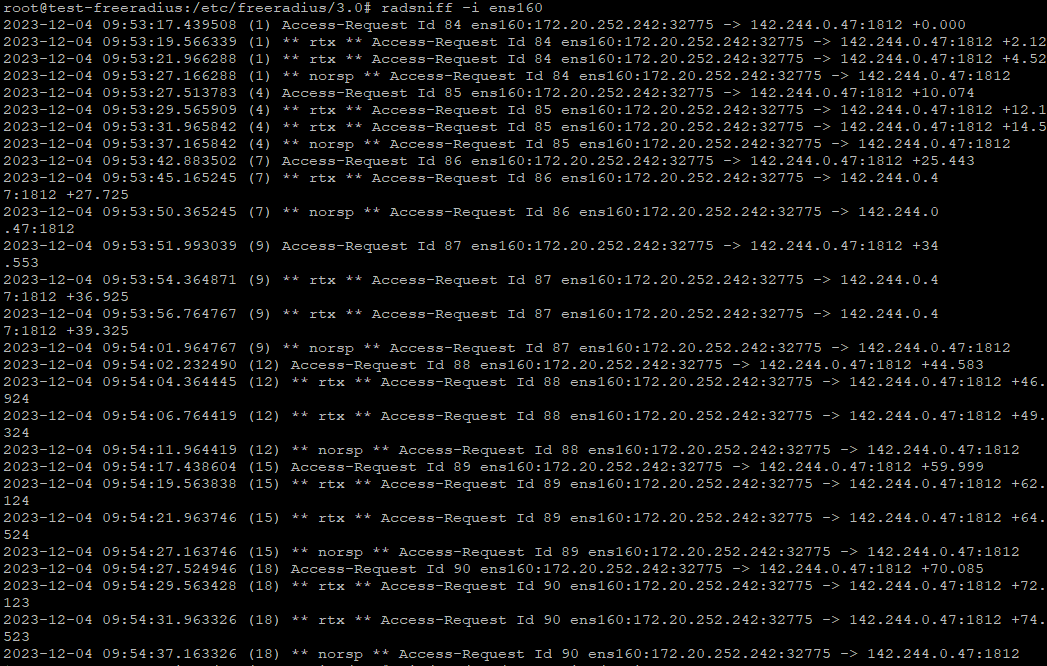
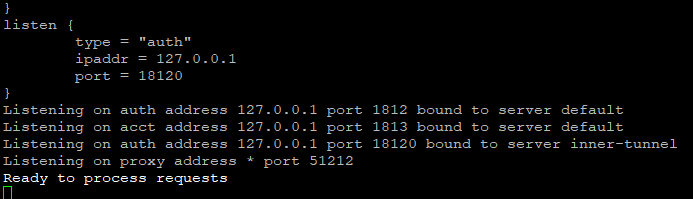
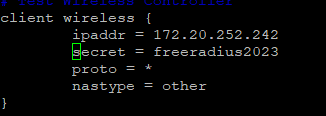

I have confirmed from the team and there's nothing blocking freeradius to reach the WLC. The WLC is open to everything in the organisation. The packets are reaching freeradius as I can see an "Access-Request" on FreeRadius (from radsniff and tcpdump). Attaching a screenshot for reference.
From your tcpdump and radsniff you only see the packet(s) comming to ens160 not to freeradius. Your freeradius is listening on localhost, right? -- Ludo

On 04/12/2023 18:10, Deepansha Gaur wrote:
Hi Alan,
I have confirmed from the team and there's nothing blocking freeradius to reach the WLC. The WLC is open to everything in the organisation. The packets are reaching freeradius as I can see an "Access-Request" on FreeRadius (from radsniff and tcpdump). Attaching a screenshot for reference.
[image: image.png] The output of all this is text - just paste the text into the email rather than attaching images of text.Pasting images makes things harder for people attempting to read your output. However, freeradius -X is still here: [image: image.png]
You are listening on 127.0.0.1 - packets are arriving on 142.244.0.47 Change your first listen section (which wasn't in your output but I'm guessing is wrong) to listen { type = "auth" ipaddr = * port = 0 } Nick -- Nick Porter Porter Computing Ltd
On Dec 4, 2023, at 1:10 PM, Deepansha Gaur <dgaur@ualberta.ca> wrote:
I have confirmed from the team and there's nothing blocking freeradius to reach the WLC. The WLC is open to everything in the organisation. The packets are reaching freeradius as I can see an "Access-Request" on FreeRadius (from radsniff and tcpdump). Attaching a screenshot for reference.
Don't post screenshots. They're useless and annoying. All of the documentation for the list says don't post screenshots. Is it really that difficult to cut & paste text? For the underlying issue, Nick is right here. You're sending packets to IP X, and the server is listening on IP Y. The default configuration includes a "listen" section which has "ipaddr = *", so it will accept packets to any IP address associated with the machine. Someone edited the configuration file, and broke it. Don't do that. Do read the debug output. Do compare IP addresses. Alan DeKok.
participants (6)
-
 Alan DeKok
 -
 Deepansha Gaur
 -
 Mathias Maes
 -
 Matthew Newton
 -
 Nick Porter
 -
 Ľudovít Mikula