howto EAP-TLS on freeradius 2.0.2-3 ??

OK, radiusd -X and /etc/raddb/certs/bootstrap generated some files in /etc/raddb/certs like ca.pem ca.key 01.pem dh index.txt index.txt.attr random serial server.crt srver.key server.p12 server.pem server.csr xpxtensions etc... eap.conf point to the right paths. i intend to authenticate wireless users on xp. i though there was already a certificate and private key for wireless client, but i can see that nowhere. si i think i should create my own certificate and privatekey for client and export install it on windows xp. if i am true and did not forget something to do, my questions are: - is there any problem with the CA private key file and server file extension? (ca.key instead of cakey.pem). - which extension should i use for my windows xp certicate, and please, could you just give me the line! (like openssl req ...., openssl ca - ...-, openssl pkcs12, etc...) sorry for silly questions, but i tried and surely missed something. thank you for helping MBA OYONE Joël Lot. El Firdaous Bât GH20, Porte A 204, Appt 8 20000 Oulfa Casablanca - Maroc Tél. : +212 69 25 85 70 __________________________________________________ Do You Yahoo!? En finir avec le spam? Yahoo! Mail vous offre la meilleure protection possible contre les messages non sollicités http://mail.yahoo.fr Yahoo! Mail

There is a readme file in certs folder explaining how to make client certificates. Ivan Kalik Kalik Informatika ISP Dana 3/5/2008, "Joel MBA OYONE" <mba_oyone@yahoo.fr> piše:
OK, radiusd -X and /etc/raddb/certs/bootstrap generated some files in /etc/raddb/certs like ca.pem ca.key 01.pem dh index.txt index.txt.attr random serial server.crt srver.key server.p12 server.pem server.csr xpxtensions etc... eap.conf point to the right paths. i intend to authenticate wireless users on xp. i though there was already a certificate and private key for wireless client, but i can see that nowhere. si i think i should create my own certificate and privatekey for client and export install it on windows xp. if i am true and did not forget something to do, my questions are: - is there any problem with the CA private key file and server file extension? (ca.key instead of cakey.pem). - which extension should i use for my windows xp certicate, and please, could you just give me the line! (like openssl req ...., openssl ca - ...-, openssl pkcs12, etc...) sorry for silly questions, but i tried and surely missed something. thank you for helping
MBA OYONE Joël Lot. El Firdaous Bât GH20, Porte A 204, Appt 8 20000 Oulfa Casablanca - Maroc
Tél. : +212 69 25 85 70
__________________________________________________ Do You Yahoo!? En finir avec le spam? Yahoo! Mail vous offre la meilleure protection possible contre les messages non sollicités http://mail.yahoo.fr Yahoo! Mail
- List info/subscribe/unsubscribe? See http://www.freeradius.org/list/users.html
Hi, i did, as the certs/README file said: - make ca.pem - make ca.der - make server.pem - make client.pem and sometimes - make server.csr - make server.crt - make client.crt but still unable to authenticate (even if i can see the authentication attempts). my eap.cof points to right files right now, i wonder if it is not an extension problem. i imported on xp -mmc, then adding certificate console: - ca.der ---- no prob, known as an CA in windows - server.p12 ---no prob, certicate is valid - client.p12 --- !!! windows said something like that (excuse my english translation, but i think you'll get the message): --CA ---Server -------clients: ---Information about the certificate: --- ****this certificate is not valide cause one of the certificate authority in the certificate path seems not to be allow to deliver certificate, or this certificate can not be use as end-user certificate ***** (see attached file) could you please help me to fix that? and i would like you to verify my /etc/ssl/openssl.cnf file - see below -; is it according with extensions stuffs for xp clients? - the "extensions" file is still located in "/etc/raddb/certs/extensions". is it right? /etc/ssl/openssl.cnf content is: ================================================== # # OpenSSL example configuration file. # This is mostly being used for generation of certificate requests. # # This definition stops the following lines choking if HOME isn't # defined. HOME = . RANDFILE = $ENV::HOME/.rnd # Extra OBJECT IDENTIFIER info: #oid_file = $ENV::HOME/.oid oid_section = new_oids # To use this configuration file with the "-extfile" option of the # "openssl x509" utility, name here the section containing the # X.509v3 extensions to use: # extensions = # (Alternatively, use a configuration file that has only # X.509v3 extensions in its main [= default] section.) [ new_oids ] # We can add new OIDs in here for use by 'ca' and 'req'. # Add a simple OID like this: # testoid1=1.2.3.4 # Or use config file substitution like this: # testoid2=${testoid1}.5.6 #################################################################### [ ca ] default_ca = CA_default # The default ca section #################################################################### [ CA_default ] dir = ./demoCA # Where everything is kept certs = $dir/certs # Where the issued certs are kept crl_dir = $dir/crl # Where the issued crl are kept database = $dir/index.txt # database index file. #unique_subject = no # Set to 'no' to allow creation of # several ctificates with same subject. new_certs_dir = $dir/newcerts # default place for new certs. certificate = $dir/cacert.pem # The CA certificate serial = $dir/serial # The current serial number crlnumber = $dir/crlnumber # the current crl number # must be commented out to leave a V1 CRL crl = $dir/crl.pem # The current CRL private_key = $dir/private/cakey.pem# The private key RANDFILE = $dir/private/.rand # private random number file x509_extensions = usr_cert # The extentions to add to the cert # Comment out the following two lines for the "traditional" # (and highly broken) format. name_opt = ca_default # Subject Name options cert_opt = ca_default # Certificate field options # Extension copying option: use with caution. # copy_extensions = copy # Extensions to add to a CRL. Note: Netscape communicator chokes on V2 CRLs # so this is commented out by default to leave a V1 CRL. # crlnumber must also be commented out to leave a V1 CRL. # crl_extensions = crl_ext default_days = 365 # how long to certify for default_crl_days= 30 # how long before next CRL default_md = sha1 # which md to use. preserve = no # keep passed DN ordering # A few difference way of specifying how similar the request should look # For type CA, the listed attributes must be the same, and the optional # and supplied fields are just that :-) policy = policy_match # For the CA policy [ policy_match ] countryName = match stateOrProvinceName = match organizationName = match organizationalUnitName = optional commonName = supplied emailAddress = optional # For the 'anything' policy # At this point in time, you must list all acceptable 'object' # types. [ policy_anything ] countryName = optional stateOrProvinceName = optional localityName = optional organizationName = optional organizationalUnitName = optional commonName = supplied emailAddress = optional #################################################################### [ req ] default_bits = 1024 default_keyfile = privkey.pem distinguished_name = req_distinguished_name attributes = req_attributes x509_extensions = v3_ca # The extentions to add to the self signed cert # Passwords for private keys if not present they will be prompted for # input_password = secret # output_password = secret # This sets a mask for permitted string types. There are several options. # default: PrintableString, T61String, BMPString. # pkix : PrintableString, BMPString. # utf8only: only UTF8Strings. # nombstr : PrintableString, T61String (no BMPStrings or UTF8Strings). # MASK:XXXX a literal mask value. # WARNING: current versions of Netscape crash on BMPStrings or UTF8Strings # so use this option with caution! string_mask = nombstr # req_extensions = v3_req # The extensions to add to a certificate request [ req_distinguished_name ] countryName = Country Name (2 letter code) countryName_default = AU countryName_min = 2 countryName_max = 2 stateOrProvinceName = State or Province Name (full name) stateOrProvinceName_default = Some-State localityName = Locality Name (eg, city) 0.organizationName = Organization Name (eg, company) 0.organizationName_default = Internet Widgits Pty Ltd # we can do this but it is not needed normally :-) #1.organizationName = Second Organization Name (eg, company) #1.organizationName_default = World Wide Web Pty Ltd organizationalUnitName = Organizational Unit Name (eg, section) #organizationalUnitName_default = commonName = Common Name (eg, YOUR name) commonName_max = 64 emailAddress = Email Address emailAddress_max = 64 # SET-ex3 = SET extension number 3 [ req_attributes ] challengePassword = A challenge password challengePassword_min = 4 challengePassword_max = 20 unstructuredName = An optional company name [ usr_cert ] # These extensions are added when 'ca' signs a request. # This goes against PKIX guidelines but some CAs do it and some software # requires this to avoid interpreting an end user certificate as a CA. basicConstraints=CA:FALSE # Here are some examples of the usage of nsCertType. If it is omitted # the certificate can be used for anything *except* object signing. # This is OK for an SSL server. # nsCertType = server # For an object signing certificate this would be used. # nsCertType = objsign # For normal client use this is typical # nsCertType = client, email # and for everything including object signing: # nsCertType = client, email, objsign # This is typical in keyUsage for a client certificate. # keyUsage = nonRepudiation, digitalSignature, keyEncipherment # This will be displayed in Netscape's comment listbox. nsComment = "OpenSSL Generated Certificate" # PKIX recommendations harmless if included in all certificates. subjectKeyIdentifier=hash authorityKeyIdentifier=keyid,issuer # This stuff is for subjectAltName and issuerAltname. # Import the email address. # subjectAltName=email:copy # An alternative to produce certificates that aren't # deprecated according to PKIX. # subjectAltName=email:move # Copy subject details # issuerAltName=issuer:copy #nsCaRevocationUrl = http://www.domain.dom/ca-crl.pem #nsBaseUrl #nsRevocationUrl #nsRenewalUrl #nsCaPolicyUrl #nsSslServerName [ v3_req ] # Extensions to add to a certificate request basicConstraints = CA:FALSE keyUsage = nonRepudiation, digitalSignature, keyEncipherment [ v3_ca ] # Extensions for a typical CA # PKIX recommendation. subjectKeyIdentifier=hash authorityKeyIdentifier=keyid:always,issuer:always # This is what PKIX recommends but some broken software chokes on critical # extensions. #basicConstraints = critical,CA:true # So we do this instead. basicConstraints = CA:true # Key usage: this is typical for a CA certificate. However since it will # prevent it being used as an test self-signed certificate it is best # left out by default. # keyUsage = cRLSign, keyCertSign # Some might want this also # nsCertType = sslCA, emailCA # Include email address in subject alt name: another PKIX recommendation # subjectAltName=email:copy # Copy issuer details # issuerAltName=issuer:copy # DER hex encoding of an extension: beware experts only! # obj=DER:02:03 # Where 'obj' is a standard or added object # You can even override a supported extension: # basicConstraints= critical, DER:30:03:01:01:FF [ crl_ext ] # CRL extensions. # Only issuerAltName and authorityKeyIdentifier make any sense in a CRL. # issuerAltName=issuer:copy authorityKeyIdentifier=keyid:always,issuer:always [ proxy_cert_ext ] # These extensions should be added when creating a proxy certificate # This goes against PKIX guidelines but some CAs do it and some software # requires this to avoid interpreting an end user certificate as a CA. basicConstraints=CA:FALSE # Here are some examples of the usage of nsCertType. If it is omitted # the certificate can be used for anything *except* object signing. # This is OK for an SSL server. # nsCertType = server # For an object signing certificate this would be used. # nsCertType = objsign # For normal client use this is typical # nsCertType = client, email # and for everything including object signing: # nsCertType = client, email, objsign # This is typical in keyUsage for a client certificate. # keyUsage = nonRepudiation, digitalSignature, keyEncipherment # This will be displayed in Netscape's comment listbox. nsComment = "OpenSSL Generated Certificate" # PKIX recommendations harmless if included in all certificates. subjectKeyIdentifier=hash authorityKeyIdentifier=keyid,issuer:always # This stuff is for subjectAltName and issuerAltname. # Import the email address. # subjectAltName=email:copy # An alternative to produce certificates that aren't # deprecated according to PKIX. # subjectAltName=email:move # Copy subject details # issuerAltName=issuer:copy #nsCaRevocationUrl = http://www.domain.dom/ca-crl.pem #nsBaseUrl #nsRevocationUrl #nsRenewalUrl #nsCaPolicyUrl #nsSslServerName # This really needs to be in place for it to be a proxy certificate. proxyCertInfo=critical,language:id-ppl-anyLanguage,pathlen:3,policy:foo ================================================================ (no radiusd -X log, cause i am away from the place. if required, i will post it when i will be at). Thank you very much for your precious help. --- Ivan Kalik <tnt@kalik.net> a écrit :
There is a readme file in certs folder explaining how to make client certificates.
Ivan Kalik Kalik Informatika ISP
Dana 3/5/2008, "Joel MBA OYONE" <mba_oyone@yahoo.fr> pi¹e:
OK, radiusd -X and /etc/raddb/certs/bootstrap generated some files in /etc/raddb/certs like ca.pem ca.key 01.pem dh index.txt index.txt.attr random serial server.crt srver.key server.p12 server.pem server.csr xpxtensions etc... eap.conf point to the right paths. i intend to authenticate wireless users on xp. i though there was already a certificate and private key for wireless client, but i can see that nowhere. si i think i should create my own certificate and privatekey for client and export install it on windows xp. if i am true and did not forget something to do, my questions are: - is there any problem with the CA private key file and server file extension? (ca.key instead of cakey.pem). - which extension should i use for my windows xp certicate, and please, could you just give me the line! (like openssl req ...., openssl ca - ...-, openssl pkcs12, etc...) sorry for silly questions, but i tried and surely missed something. thank you for helping
MBA OYONE Joël Lot. El Firdaous Bât GH20, Porte A 204, Appt 8 20000 Oulfa Casablanca - Maroc
Tél. : +212 69 25 85 70
__________________________________________________ Do You Yahoo!? En finir avec le spam? Yahoo! Mail vous offre la meilleure protection possible contre les messages non sollicités http://mail.yahoo.fr Yahoo! Mail
- List info/subscribe/unsubscribe? See http://www.freeradius.org/list/users.html
- List info/subscribe/unsubscribe? See http://www.freeradius.org/list/users.html
MBA OYONE Joël Lot. El Firdaous Bât GH20, Porte A 204, Appt 8 20000 Oulfa Casablanca - Maroc Tél. : +212 69 25 85 70 __________________________________________________ Do You Yahoo!? En finir avec le spam? Yahoo! Mail vous offre la meilleure protection possible contre les messages non sollicités http://mail.yahoo.fr Yahoo! Mail
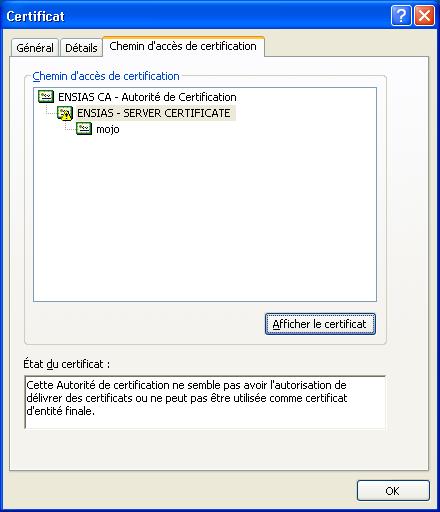
- ca.der ---- no prob, known as an CA in windows - server.p12 ---no prob, certicate is valid - client.p12 --- !!! windows said something like that (excuse my english translation, but i think you'll get the message):
--CA ---Server -------clients:
---Information about the certificate: --- ****this certificate is not valide cause one of the certificate authority in the certificate path seems not to be allow to deliver certificate, or this certificate can not be use as end-user certificate ***** (see attached file)
http://technet.microsoft.com/en-us/library/bb331963(EXCHG.80).aspx It looks like the certificate doesn't have the OIDs needed. They should be present in certificate details (Details tab). Post radiusd -X to see what happens. Ivan Kalik Kalik Informatika ISP
participants (2)
-
 Ivan Kalik
 -
 Joel MBA OYONE