EAP TLS certificates - Questions

hello, I have this scenario in full operation at my work. I came here to try to solve some doubts, in case someone who uses this scenario may have passed. In many cell phones with the android operating system they require the option "domain" to be configured. For example my phone is android and does not require this option to be filled in. The thing is, on phones that require it, the connection is failing because we have no idea how to set the "domain". We tried only the domain, we tried the FQDN, both in lowercase and uppercase. Any ideas to help me? -- Elias Pereira

Elias Pereira <empbilly@gmail.com> writes:
The thing is, on phones that require it, the connection is failing because we have no idea how to set the "domain".
On Android 11 and newer the domain apparently has to match the CN field of the Radius server's certificate. The default for Freeradius is Example Server Certificate. This worked for me when I faced this problem as I didn't change the default when I setup my little home network with Freeradius and EAP TLS.

On Dec 9, 2021, at 4:37 PM, Anssi Saari <as@sci.fi> wrote:
On Android 11 and newer the domain apparently has to match the CN field of the Radius server's certificate. The default for Freeradius is Example Server Certificate.
So... edit the files in raddb/certs, and create new certificates with the correct domain. Alan DeKok.
Thanks Anssi and Alan!!! In my research I found the link below that shows how to set the [alt_names] option in server.cnf and also in the xpextensions file. subjectAltName = @alt_names [alt_names] DNS.1 = radius.company.net https://wiki.alpinelinux.org/wiki/FreeRadius_EAP-TLS_configuration Will this option work? On Fri, Dec 10, 2021 at 10:01 AM Alan DeKok <aland@deployingradius.com> wrote:
On Dec 9, 2021, at 4:37 PM, Anssi Saari <as@sci.fi> wrote:
On Android 11 and newer the domain apparently has to match the CN field of the Radius server's certificate. The default for Freeradius is Example Server Certificate.
So... edit the files in raddb/certs, and create new certificates with the correct domain.
Alan DeKok.
- List info/subscribe/unsubscribe? See http://www.freeradius.org/list/users.html
-- Elias Pereira
On Dec 10, 2021, at 8:17 AM, Elias Pereira <empbilly@gmail.com> wrote:
In my research I found the link below that shows how to set the [alt_names] option in server.cnf and also in the xpextensions file.
subjectAltName = @alt_names
[alt_names] DNS.1 = radius.company.net
https://wiki.alpinelinux.org/wiki/FreeRadius_EAP-TLS_configuration
As I said... the files included with FreeRADIUS work. The files included with FreeRADIUS *already* have those fields set, and documented. I have no idea why people insist on ignoring the documentation that comes with the server, and instead troll around the net randomly looking for things. Alan DeKok.
Alan DeKok <aland@deployingradius.com> writes:
On Dec 9, 2021, at 4:37 PM, Anssi Saari <as@sci.fi> wrote:
On Android 11 and newer the domain apparently has to match the CN field of the Radius server's certificate. The default for Freeradius is Example Server Certificate.
So... edit the files in raddb/certs, and create new certificates with the correct domain.
Hm. I'm not sure you understood they Elias's question? As I understood it, it was "what needs to go in the domain field of wifi settings in Android devices that won't let you leave it empty?" I believe I answered that but his followup question I don't understand. And I'm not sure my answer is correct, it's just "it works for me". Maybe because of some fluke or bug in Android. Come to think of it, do you have some idea why Android devices even have a domain field in their wifi settings? NetworkManager in Linux too. Does it have some standard meaning in EAP in general? And is the meaning what Android now requires, namely that domain and server cert's CN match, something that makes sense to you? Or are these too much of client side questions?
On Dec 10, 2021, at 9:00 AM, Anssi Saari <as@sci.fi> wrote:
Hm. I'm not sure you understood they Elias's question? As I understood it, it was "what needs to go in the domain field of wifi settings in Android devices that won't let you leave it empty?" I believe I answered that but his followup question I don't understand. And I'm not sure my answer is correct, it's just "it works for me". Maybe because of some fluke or bug in Android.
The SubjectAltName field has to be a domain name. The client device should be configured with the same domain name. This practice is similar to web surfing, but for EAP. "I want to connect to foo.com, and the web site / EAP server presents a certificate for foo.com"
Come to think of it, do you have some idea why Android devices even have a domain field in their wifi settings? NetworkManager in Linux too. Does it have some standard meaning in EAP in general? And is the meaning what Android now requires, namely that domain and server cert's CN match, something that makes sense to you? Or are these too much of client side questions?
The new WBA standards are now requiring this behavior. I've been arguing with the standards body people for ~3 years on how to get this done (a) easily, and (b) securely. The main problem is that many of the standards people are far removed from customer interaction. So they don't understand that configuring WiFi is painful and horrible for most people. Alan DeKok.
The problem is this new android 11 rule that requires us to put the domain in the EAP-TLS configuration. It's a pain in the ass! Anyway, I will try the extra settings that are requested. On Fri, Dec 10, 2021 at 11:06 AM Alan DeKok <aland@deployingradius.com> wrote:
On Dec 10, 2021, at 9:00 AM, Anssi Saari <as@sci.fi> wrote:
Hm. I'm not sure you understood they Elias's question? As I understood it, it was "what needs to go in the domain field of wifi settings in Android devices that won't let you leave it empty?" I believe I answered that but his followup question I don't understand. And I'm not sure my answer is correct, it's just "it works for me". Maybe because of some fluke or bug in Android.
The SubjectAltName field has to be a domain name. The client device should be configured with the same domain name.
This practice is similar to web surfing, but for EAP. "I want to connect to foo.com, and the web site / EAP server presents a certificate for foo.com"
Come to think of it, do you have some idea why Android devices even have a domain field in their wifi settings? NetworkManager in Linux too. Does it have some standard meaning in EAP in general? And is the meaning what Android now requires, namely that domain and server cert's CN match, something that makes sense to you? Or are these too much of client side questions?
The new WBA standards are now requiring this behavior.
I've been arguing with the standards body people for ~3 years on how to get this done (a) easily, and (b) securely. The main problem is that many of the standards people are far removed from customer interaction. So they don't understand that configuring WiFi is painful and horrible for most people.
Alan DeKok.
- List info/subscribe/unsubscribe? See http://www.freeradius.org/list/users.html
-- Elias Pereira

I do not see an option on my Android device to configure FQDN manually, but you can create a profile for Android and install it. Check this page https://source.android.com/devices/tech/connect/wifi-passpoint you will find an xml example of profile. Android 11 by documentation should use node AAAServerTrustedNames, maybe this works on Pixel or other devices that use stock Android. My device from Samsung uses this xml node to check CN in radius server certificate. <Node> <NodeName>FQDN</NodeName> <Value>hotspot.example.net</Value> </Node> Android < 11 also uses FQDN node to check CN On Thu, 16 Dec 2021 at 22:57, Elias Pereira <empbilly@gmail.com> wrote:
The problem is this new android 11 rule that requires us to put the domain in the EAP-TLS configuration. It's a pain in the ass!
hello work vplp, I am talking about the domain option in the image below. [image: image.png] On Thu, Dec 16, 2021 at 4:17 PM work vlpl <thework.vlpl@gmail.com> wrote:
I do not see an option on my Android device to configure FQDN manually, but you can create a profile for Android and install it. Check this page https://source.android.com/devices/tech/connect/wifi-passpoint you will find an xml example of profile.
Android 11 by documentation should use node AAAServerTrustedNames, maybe this works on Pixel or other devices that use stock Android. My device from Samsung uses this xml node to check CN in radius server certificate.
<Node> <NodeName>FQDN</NodeName> <Value>hotspot.example.net</Value> </Node>
Android < 11 also uses FQDN node to check CN
On Thu, 16 Dec 2021 at 22:57, Elias Pereira <empbilly@gmail.com> wrote:
The problem is this new android 11 rule that requires us to put the domain in the EAP-TLS configuration. It's a pain in the ass!
- List info/subscribe/unsubscribe? See http://www.freeradius.org/list/users.html
-- Elias Pereira
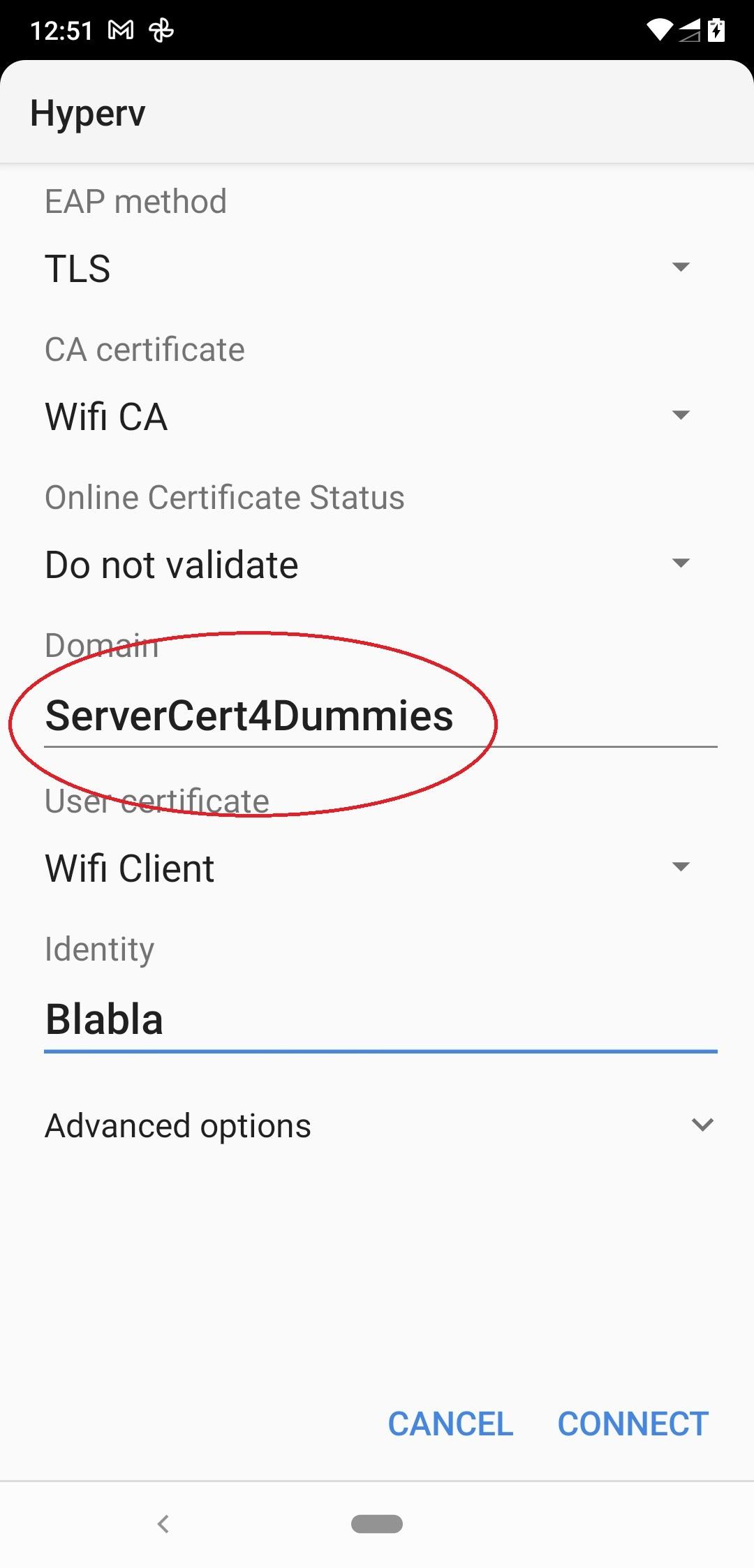
It should be CN from cert. Maybe SAN also will work I didn't test it. On Fri, 17 Dec 2021 at 05:20, Elias Pereira <empbilly@gmail.com> wrote:
hello work vplp,
I am talking about the domain option in the image below.
[image: image.png]
On Thu, Dec 16, 2021 at 4:17 PM work vlpl <thework.vlpl@gmail.com> wrote:
I do not see an option on my Android device to configure FQDN manually, but you can create a profile for Android and install it. Check this page https://source.android.com/devices/tech/connect/wifi-passpoint you will find an xml example of profile.
Android 11 by documentation should use node AAAServerTrustedNames, maybe this works on Pixel or other devices that use stock Android. My device from Samsung uses this xml node to check CN in radius server certificate.
<Node> <NodeName>FQDN</NodeName> <Value>hotspot.example.net</Value> </Node>
Android < 11 also uses FQDN node to check CN
On Thu, 16 Dec 2021 at 22:57, Elias Pereira <empbilly@gmail.com> wrote:
The problem is this new android 11 rule that requires us to put the domain in the EAP-TLS configuration. It's a pain in the ass!
- List info/subscribe/unsubscribe? See http://www.freeradius.org/list/users.html
-- Elias Pereira - List info/subscribe/unsubscribe? See http://www.freeradius.org/list/users.html
Ok. And can CN have writing spaces? Example: "My CN server" On Fri, Dec 17, 2021 at 2:01 PM work vlpl <thework.vlpl@gmail.com> wrote:
It should be CN from cert. Maybe SAN also will work I didn't test it.
On Fri, 17 Dec 2021 at 05:20, Elias Pereira <empbilly@gmail.com> wrote:
hello work vplp,
I am talking about the domain option in the image below.
[image: image.png]
On Thu, Dec 16, 2021 at 4:17 PM work vlpl <thework.vlpl@gmail.com>
wrote:
I do not see an option on my Android device to configure FQDN manually, but you can create a profile for Android and install it. Check this page https://source.android.com/devices/tech/connect/wifi-passpoint you will find an xml example of profile.
Android 11 by documentation should use node AAAServerTrustedNames, maybe this works on Pixel or other devices that use stock Android. My device from Samsung uses this xml node to check CN in radius server certificate.
<Node> <NodeName>FQDN</NodeName> <Value>hotspot.example.net</Value> </Node>
Android < 11 also uses FQDN node to check CN
On Thu, 16 Dec 2021 at 22:57, Elias Pereira <empbilly@gmail.com>
The problem is this new android 11 rule that requires us to put the domain in the EAP-TLS configuration. It's a pain in the ass!
- List info/subscribe/unsubscribe? See http://www.freeradius.org/list/users.html
-- Elias Pereira - List info/subscribe/unsubscribe? See http://www.freeradius.org/list/users.html
wrote: - List info/subscribe/unsubscribe? See http://www.freeradius.org/list/users.html
-- Elias Pereira
On Dec 9, 2021, at 8:20 AM, Elias Pereira <empbilly@gmail.com> wrote:
In many cell phones with the android operating system they require the option "domain" to be configured. For example my phone is android and does not require this option to be filled in.
To be configured... where?
The thing is, on phones that require it, the connection is failing because we have no idea how to set the "domain".
Failing... how?
We tried only the domain, we tried the FQDN, both in lowercase and uppercase.
Tried... what? And where?
Any ideas to help me?
Follow the guide on my web page :http://deployingradius.com/ Use the files in raddb/certs to create certificates. Import the CA / client certs onto the client devices. It will work. The problem here is that you didn't explain anything about what you did. So it's very difficult to help you. Alan DeKok.
participants (4)
-
 Alan DeKok
 -
 Anssi Saari
 -
 Elias Pereira
 -
 work vlpl