Eshun Benjamin a écrit :
Could please send your log message when the user with the it-master-class1 in it's CA list tries to authenticate
==================================================
Benjamin K. Eshun OK here are the logs in order to further investigate. first the radiusd start in debug mode:
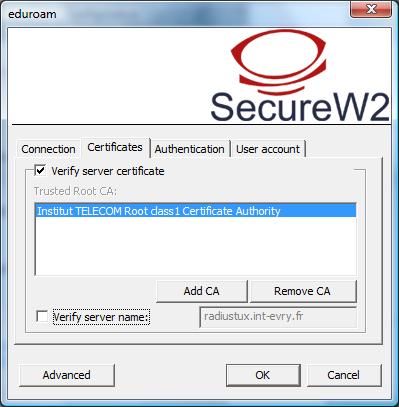
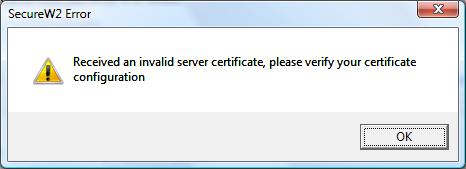
$ /usr/sbin/radiusd -X FreeRADIUS Version 2.0.3, for host i686-redhat-linux-gnu, built on Jun 3 2008 at 19:30:19 radiusd: #### Loading Virtual Servers #### ... server { ... Module: Instantiating eap eap { default_eap_type = "ttls" ... Module: Instantiating eap-tls tls { rsa_key_exchange = no dh_key_exchange = yes rsa_key_length = 512 dh_key_length = 512 verify_depth = 0 pem_file_type = yes private_key_file = "/etc/raddb/certs/radiux-pkiit-2008.key.pass.pem" certificate_file = "/etc/raddb/certs/radiux-pkiit-2008.pem" CA_file = "/etc/raddb/certs/ca-chain-institut-telecom_long.crt" private_key_password = "secret" dh_file = "/etc/raddb/certs/dh" random_file = "/etc/raddb/certs/random" fragment_size = 1024 include_length = yes check_crl = no check_cert_cn = "%{Stripped-User-Name:-%{User-Name}:-none}" cipher_list = "DEFAULT" } Module: Linked to sub-module rlm_eap_ttls Module: Instantiating eap-ttls ttls { default_eap_type = "gtc" copy_request_to_tunnel = yes use_tunneled_reply = yes } ... } Listening on authentication address * port 1812 Listening on accounting address * port 1813 Listening on proxy address * port 1814 Ready to process requests. Then, when a windows secureW2 users which checks certificates (cf .jpg attached) try to authenticate without success rad_recv: Access-Request packet from host 157.159.27.100 port 32768, id=225, length=209 User-Name = "anonymous@it-sudparis.eu" Calling-Station-Id = "00-1F-3C-59-5E-52" Called-Station-Id = "00-1F-9D-22-72-E0:eduroam" ... rlm_realm: Adding Realm = "it-sudparis.eu" rlm_realm: Authentication realm is LOCAL. ... ++[pap] returns noop rad_check_password: Found Auth-Type EAP auth: type "EAP" +- entering group EAP rlm_eap: Request found, released from the list rlm_eap: EAP/ttls rlm_eap: processing type ttls rlm_eap_ttls: Authenticate rlm_eap_tls: processing TLS TLS Length 50 rlm_eap_tls: Length Included eaptls_verify returned 11 (other): before/accept initialization TLS_accept: before/accept initialization rlm_eap_tls: <<< TLS 1.0 Handshake [length 002d], ClientHello TLS_accept: SSLv3 read client hello A rlm_eap_tls: >>> TLS 1.0 Handshake [length 004a], ServerHello TLS_accept: SSLv3 write server hello A rlm_eap_tls: >>> TLS 1.0 Handshake [length 06fc], Certificate TLS_accept: SSLv3 write certificate A rlm_eap_tls: >>> TLS 1.0 Handshake [length 0004], ServerHelloDone TLS_accept: SSLv3 write server done A TLS_accept: SSLv3 flush data TLS_accept: Need to read more data: SSLv3 read client certificate A In SSL Handshake Phase In SSL Accept mode eaptls_process returned 13 ++[eap] returns handled Sending Access-Challenge of id 226 to 157.159.27.100 port 32768 EAP-Message = 0x0104040015c000000759160301004a02000046030148c4d73e9a1754c3d2321f1820840f38a8e62c3e4ca0ef122375dc1f94f28bf92005603c95ef0eb1d835531cea0ffd11b033d8e8ff7ba7227a45460aed42b7e54b000a0016030106fc0b0006f80006f50006f2308206ee308204d6a00302010202014d300d06092a864886f70d01010505003081a2314330410603550403143a54454c45434f4d2026204d616e6167656d656e7420537564506172697320636c6173733320436572746966696361746520417574686f7269747931263024060355040b141d54454c45434f4d2026204d616e6167656d656e74205375645061726973312630240603 EAP-Message = 0x55040a141d54454c45434f4d2026204d616e6167656d656e74205375645061726973310b3009060355040613026672301e170d3038303532373135323931335a170d3039303532373135323931335a308186310b30090603550406130266723110300e060355040813074573736f6e6e65310d300b060355040713044576727931273025060355040a131e54656c65636f6d206574204d616e6167656d656e74205375645061726973310d300b060355040b130473326961311e301c060355040313157261646975782e69742d73756470617269732e657530819f300d06092a864886f70d010101050003818d0030818902818100c01f06db2f842d54 EAP-Message = 0x78a307eae5f0796e31384a4e9162a81923f9958d3dd20364727bae95f6f5edf404b2c767836906a705a409fe65d95826134c8f90d479939e51059634a503cc5b942c6df13a8e378c2979573b9e19d000e3d0ff37e3cc9621d3a08507d0c1e5b156ab2b0ec7f18641ccd15886b2571ed5d84d7005f835959b0203010001a38202cb308202c7301106096086480186f8420101040403020640300b0603551d0f0404030205e030130603551d25040c300a06082b06010505070301303e06096086480186f84201040431162f687474703a2f2f63612e69742d73756470617269732e65752f706b692f544d53505f43412f63726c2d76312e63726c301d06 EAP-Message = 0x03551d0e04160414e5b49fb229de0a48baf59832e0fbeecdba10a6ce3081a50603551d2304819d30819a8014c060d15966db10cb580bfc55a60cb9323c6be3a1a17fa47d307b313630340603550403132d496e7374697475742054454c45434f4d20636c6173733220436572746966696361746520417574686f7269747931193017060355040b1310496e7374697475742054454c45434f4d31193017060355040a1310496e7374697475742054454c45434f4d310b3009060355040613026672820101304906082b06010505070101043d303b303906082b06010505073002862d687474703a2f2f63612e69742d73756470617269732e65752f706b EAP-Message = 0x692f544d53505f43412f6974 Message-Authenticator = 0x00000000000000000000000000000000 State = 0x93e1b6b492e5a31188c469ba2a413593 Finished request 7. Going to the next request Waking up in 4.9 seconds. rad_recv: Access-Request packet from host 157.159.27.100 port 32768, id=227, length=204 User-Name = "anonymous@it-sudparis.eu" Calling-Station-Id = "00-1F-3C-59-5E-52" Called-Station-Id = "00-1F-9D-22-72-E0:eduroam" ... ... 2nd time !?, the same treatment I presume ? ++[pap] returns noop rad_check_password: Found Auth-Type EAP auth: type "EAP" +- entering group EAP rlm_eap: Request found, released from the list rlm_eap: EAP/ttls rlm_eap: processing type ttls rlm_eap_ttls: Authenticate rlm_eap_tls: processing TLS rlm_eap_tls: Received EAP-TLS ACK message rlm_eap_tls: ack handshake fragment handler eaptls_verify returned 1 eaptls_process returned 13 ++[eap] returns handled Sending Access-Challenge of id 227 to 157.159.27.100 port 32768 EAP-Message = 0x0105036d15800000075963612e63727430400603551d1f043930373035a033a031862f687474703a2f2f63612e69742d73756470617269732e65752f706b692f544d53505f43412f63726c2d76322e63726c30819c0603551d2004819430819130818e060429010101308185303406082b060105050702011628687474703a2f2f63612e69742d73756470617269732e65752f706b692f544d53505f43412f435053304d06082b0601050507020230411a3f4c696d69746564204c696162696c6974792c2073656520687474703a2f2f63612e69742d73756470617269732e65752f706b692f544d53505f43412f435055303d0603551d120436303481 EAP-Message = 0x1761646d696e706b694069742d73756470617269732e65758619687474703a2f2f7777772e69742d73756470617269732e6575301e0603551d11041730158113733269612d69737240696e742d6564752e6575300d06092a864886f70d010105050003820201009face565aceeac5212003ac162156be138cd6db700d4faa3113d50d0ea3f55e476817b9aaae953d8f832e1819f8469a9a5561f886f1aab1ffc9d48ffd39875546b3f59c7ccde6c165d454b190c439c89ee7e4ab5cdc5b1c138bb321428fa001e0fbb1a5a05f4ebba8300ff65ae797efa9f3b52a90a2b41b37243183a27d2ad8f0cb90f37e01cd3e4f4ac56e440b1a53cf73930d7ccc4 EAP-Message = 0x68822683b7c1f799223295c1c90ae1e9b993b7d30c9c53ae70bd64cd6d199f0da5c5ea995300bc53cf3f356650e79d304a59e32253e8e8ca93e284d8ae36e4976ed2db03ae165c9e01d850fff552a942f4391d05bb706279bcb1273e6d0e4355a50623e636403993f399fb758cb2bf5eb475e09dfc2a037b26a14514e714aab53398099386cb60a20b101eac27c82fe95b1cd4ab6426aaac13c1bbf0c3775d418e15c5996c8131831f30a0e1f3753ea7723ae15daaa17b20163a548a6adff64b77f5df43ca602bf2e0757736eb0641d483345f8fc0cdaecf0430f75eaf0f14708d692572f7f50da4c68bdd0215510601c7f9fed39a98995a6821a4be3e EAP-Message = 0x6896ec0b08a33450a6c348bbef00fcbd4d99de83b82cc4bdcd8e911d9e93591cac98600aff37f04ed6608d239a46f5b2ea7be3faaaec1448839e201c4c1b1a45fcc54e753ec11ff1c3f2399348cfb9b2a78afcc29604d0543cb496bd74c67e81ab8c20c2c3d58001cb0f801ec816030100040e000000 Message-Authenticator = 0x00000000000000000000000000000000 State = 0x93e1b6b491e4a31188c469ba2a413593 Finished request 8. Going to the next request Waking up in 4.9 seconds. ... Cleaning up request 6 ID 225 with timestamp +534 Cleaning up request 7 ID 226 with timestamp +534 Cleaning up request 8 ID 227 with timestamp +534 Ready to process requests. The client receives the second .jpg attached "received an invalide server certificate" . Again, I wonder on my eap.conf directives: certificate_file point to our radius SSL-server certificate => CN=radius.it-sudparis.eu but what the CA_file should point to in our case ? the it-master-class1 CA root certificate ? the it-ca-class3 CA which signed our radius server ? a bundle of the 3 CA (as it is now !) ? , in which order class1-2-3 ? class 3-2-1 ? in pem ? , der ? short or long CA files (by these I mean only what is between --BEGIN CERTIFICATE-- and --END CERTIFICATE-- or plus the "blabla" above ) ?. Perhaps only certificate_file = ${certdir}/radiux-pkiit-2008.pem could be used, but in that case radiux-pkiit-2008.pem should contain the radius server certificate + a bundle of the 3 CA, in which order ? short or long ? ... thanks for your help.
----- Message d'origine ---- De : jehan procaccia <jehan.procaccia@it-sudparis.eu> À : FreeRadius users mailing list <freeradius-users@lists.freeradius.org> Envoyé le : Vendredi, 5 Septembre 2008, 17h49mn 32s Objet : CA certificates
hello,
we are running our own PKI with a 3 level hierarchy: it-master-class1(self-signed) -> it-ca-class2 -> it-ca-class3.
it-ca-class3 signed our radius server (radiux-pkiit-2008.pem) In eap.conf file in the tls section I have tls { private_key_password = secret private_key_file = ${certdir}/radiux-pkiit-2008.key.pass.pem certificate_file = ${certdir}/radiux-pkiit-2008.pem CA_file = ${certdir}/ca-chain-institut-telecom_long.crt } unfortunaltly, securew2 windows clients configure to check certificates and having it-master-class1 in it's CA list don't accept our TLS security :-( . It tells that it received a bad certificate from the server !?.
I wonder if I didn't made a misconfiguration in radiusd/eap/tls section above . certificate_file point to our radius SSL-server certificate CN=radius.it-sudparis.eu but what the CA_file should point what in our case ? the it-master-class1 CA root certificate ? the it-ca-class3 CA which signed our radius server ? a bundle of the 3 CA (as it is now !) ? , in which order class1-2-3 ? class 3-2-1 ? in pem ? , der ? short or long CA files (by these I mean only what is between --BEGIN CERTIFICATE-- and --END CERTIFICATE-- or plus the "blabla" above ) ?. Perhaps only certificate_file = ${certdir}/radiux-pkiit-2008.pem could be used, but in that case radiux-pkiit-2008.pem should contain the radius server certificate + a bundle of the 3 CA, in which order ? short or long ? ...
You see I have lots of possibilities and interogation !.
I'am much more used to configure SSL in apache ssl.conf, to me it is clear as the directive are self explained : SSLCertificateFile /etc/pki/tls/certs/server-2008.pem SSLCertificateKeyFile /etc/pki/tls/private/server-2008.key SSLCertificateChainFile /etc/pki/tls/certs/ca-chain-institut-telecom.crt SSLCACertificateFile /etc/pki/tls/certs/itrootca-class1.crt in eap.conf I don't see any distinction between the httpd equivalents : SSLCertificateChainFile and SSLCACertificateFile I also use openssl s-client to test my servers certs setting openssl s_client -host mutuel.it-sudparis.eu -port 443 But I cannot do the same for radius ? openssl s_client -host radius.it-sudparis.eu -port 1812 => socket: Connection refused :-( .
Thanks for your help .
- List info/subscribe/unsubscribe? See http://www.freeradius.org/list/users.html