issues with radius proxy settings

Hi Team, I am running freeradius 3.0.16 on ubuntu 18.04 as a proxy server. The setup is as such that Device enrollment management system forwards radius accounting packets to radius proxy and then radius proxy server forwards the accounting packets to one or multiple Fortigates accepting radius accounting packets. The issue I am having is when one of the Fortigate is not able to accept packets ( network level issue or firewall level issue ), the proxy server starts creating detail and detail.work files and as soon as the Fortigate interface is up it (Radius proxy) tries to push the backlog from these files. The problem is, if the interface has been down for couple of hours the backlog is so huge ( and new requests are frequently coming ) that it can not redirect current traffic to specific firewall. If I delete the detail and detail.work file and restart the free radius server then it starts functioning normally. I believe I am missing some configuration. Kindly guide me what could be the workaround for this. I am looking for following solution: 1. Is there any way to setup a notification as soon as freeradius proxy marks a fortigate as Zombie? 2. The proxy just stops functioning ( even though it is trying to process detail and detail.work files in the background ) i.e. stops forwarding accounting packets to specific firewalls even after the communication issue is resolved. How can we make it more resilient? ====================Proxy.conf================= home_server mainFortigate{ type = acct ipaddr = <<IP>> port = 1813 secret = << secret>> response_window = 40 zombie_period = 20 revive_interval = 20 status_check = status-server check_interval = 10 check_timeout = 100 num_answers_to_alive = 5 max_outstanding = 65536 coa { # Initial retransmit interval: 1..5 irt = 2 # Maximum Retransmit Timeout: 1..30 (0 == no maximum) mrt = 16 #Maximum Retransmit Count: 1..20 (0 == retransmit forever) mrc = 5 # Maximum Retransmit Duration: 5..60 mrd = 30 } } home_server_pool mainFortigatePool { type = fail-over home_server = mainFortigate } realm mainFortigateRealm { # # Realms point to pools of home servers. # # If you have a "home_server_pool" where all of the home servers # are of type "auth+acct", you can just use the "pool" # configuration item, instead of specifying both "auth_pool" # and "acct_pool". acct_pool = mainFortigatePool nostrip # There are no more configuration entries for a realm. } ============================================== ==========copy-acct-to-home-server======== =============dynamically determine the realm============= if(request:User-Name =~ /@/){ if(request:Huntgroup-Name != ''){ update control { Proxy-To-Realm := request:Huntgroup-Name } } } ================================================ Kindly let me know if more detail is needed. -- Regards Prem

On Aug 20, 2019, at 8:47 PM, Prem Khanal <prem.khanal@n4l.co.nz> wrote:
I am running freeradius 3.0.16 on ubuntu 18.04 as a proxy server.
You may want to upgrade to 3.0.19. Use the packages at http://packages.networkradius.com
The setup is as such that Device enrollment management system forwards radius accounting packets to radius proxy and then radius proxy server forwards the accounting packets to one or multiple Fortigates accepting radius accounting packets.
OK.
The issue I am having is when one of the Fortigate is not able to accept packets ( network level issue or firewall level issue ), the proxy server starts creating detail and detail.work files and as soon as the Fortigate interface is up it (Radius proxy) tries to push the backlog from these files.
That's standard.
The problem is, if the interface has been down for couple of hours the backlog is so huge ( and new requests are frequently coming ) that it can not redirect current traffic to specific firewall.
What do you mean by "cannot redirect current traffic"? But it's pretty bad when critical systems are offline for hours. We recommend keeping critical systems up, so that issues like this don't come up.
If I delete the detail and detail.work file and restart the free radius server then it starts functioning normally. I believe I am missing some configuration. Kindly guide me what could be the workaround for this.
Workaround for...
I am looking for following solution:
1. Is there any way to setup a notification as soon as freeradius proxy marks a fortigate as Zombie?
See raddb/trigger.conf. You can send an SNMP trigger, or do anything else.
2. The proxy just stops functioning ( even though it is trying to process detail and detail.work files in the background ) i.e. stops forwarding accounting packets to specific firewalls even after the communication issue is resolved. How can we make it more resilient?
Ah. That's a clearer description of the issue. FreeRADIUS shouldn't just stop proxying.
====================Proxy.conf=================
We don't need to see the configuration files.
============================================== ==========copy-acct-to-home-server========
Hmm... if you're using that virtual server, then that may be the problem. What you may be doing is *always* writing accounting packets to the detail file. Then, reading the detail file, and sending those packets upstream. As you noticed, if the detail file gets huge, then the delay for proxied packet also gets huge. The solution is to use the "robust-proxy-accounting" virtual server. That virtual server will proxy packets, and then *only* write them to the detail file if the home server is down. So once the home server comes back up, new packets will be sent immediately to the home server. Alan DeKok.
Hi Alan, Thanks for the reply. I have been trying to configure robust proxy account following the steps in https://networkradius.com/doc/3.0.10/raddb/sites-available/robust-proxy-acco... . I have only changed the IP and secret of a home home server to test if the configuration is working. But the proxy is not happening. Means the accounting packets are not forwarded to the home server. Then I tried nmap -sU -p 1813 <home server IP> which returned a success =============================================== Starting Nmap 7.60 ( https://nmap.org ) at 2019-08-26 18:34 NZST Nmap scan report for 14.1.55.78.host.layer2.co.nz (14.1.55.78) Host is up (0.010s latency). PORT STATE SERVICE 1813/udp open|filtered radacct Nmap done: 1 IP address (1 host up) scanned in 0.45 seconds ================================================= I believe I have added the relevant services to sites-enabled and mods-enabled ( attached are the screen shots ). [image: image.png] [image: image.png] I have tried running freeradius in an extended debug mode by using strace -Ff -tt freeradius -X 2>&1 | tee strace-freeradius.log and when checking the log file I couldn't see any attempt to communicate with the home server specified in robust-proxy-accounting configuration file. The only entry I found for proxy is ( not sure what does this mean ) [pid 36713] 18:23:42.431513 write(1, "(2) Proxy-State = 0x3334\n", 27(2) Proxy-State = 0x3334 Do I need to update default file to make robust proxy work? All other settings are default. Kindly guide me if I am missing some configuration. Regards Prem On Thu, Aug 22, 2019 at 7:02 AM Alan DeKok <aland@deployingradius.com> wrote:
On Aug 20, 2019, at 8:47 PM, Prem Khanal <prem.khanal@n4l.co.nz> wrote:
I am running freeradius 3.0.16 on ubuntu 18.04 as a proxy server.
You may want to upgrade to 3.0.19. Use the packages at http://packages.networkradius.com
The setup is as such that Device enrollment management system forwards radius accounting packets to radius proxy and then radius proxy server forwards the accounting packets to one or multiple Fortigates accepting radius accounting packets.
OK.
The issue I am having is when one of the Fortigate is not able to accept packets ( network level issue or firewall level issue ), the proxy server starts creating detail and detail.work files and as soon as the Fortigate interface is up it (Radius proxy) tries to push the backlog from these files.
That's standard.
The problem is, if the interface has been down for couple of hours the backlog is so huge ( and new requests are frequently coming ) that it can not redirect current traffic to specific firewall.
What do you mean by "cannot redirect current traffic"?
But it's pretty bad when critical systems are offline for hours. We recommend keeping critical systems up, so that issues like this don't come up.
If I delete the detail and detail.work file and restart the free radius server then it starts functioning normally. I believe I am missing some configuration. Kindly guide me what could be the workaround for this.
Workaround for...
I am looking for following solution:
1. Is there any way to setup a notification as soon as freeradius proxy marks a fortigate as Zombie?
See raddb/trigger.conf. You can send an SNMP trigger, or do anything else.
2. The proxy just stops functioning ( even though it is trying to process detail and detail.work files in the background ) i.e. stops forwarding accounting packets to specific firewalls even after the communication issue is resolved. How can we make it more resilient?
Ah. That's a clearer description of the issue.
FreeRADIUS shouldn't just stop proxying.
====================Proxy.conf=================
We don't need to see the configuration files.
============================================== ==========copy-acct-to-home-server========
Hmm... if you're using that virtual server, then that may be the problem.
What you may be doing is *always* writing accounting packets to the detail file. Then, reading the detail file, and sending those packets upstream.
As you noticed, if the detail file gets huge, then the delay for proxied packet also gets huge. The solution is to use the "robust-proxy-accounting" virtual server.
That virtual server will proxy packets, and then *only* write them to the detail file if the home server is down. So once the home server comes back up, new packets will be sent immediately to the home server.
Alan DeKok.
- List info/subscribe/unsubscribe? See http://www.freeradius.org/list/users.html
-- Cheers Prem

On Aug 26, 2019, at 2:52 AM, Prem Khanal <prem.khanal@n4l.co.nz> wrote:
Hi Alan,
Thanks for the reply. I have been trying to configure robust proxy account following the steps in https://networkradius.com/doc/3.0.10/raddb/sites-available/robust-proxy-acco... . I have only changed the IP and secret of a home home server to test if the configuration is working. But the proxy is not happening. Means the accounting packets are not forwarded to the home server.
And what does the debug output say? This isn't difficult.
Then I tried
nmap -sU -p 1813 <home server IP>
which returned a success
Which is entirely useless. And, a waste of your time. If you're going to debug a RADIUS server, then debug the *RADIUS SERVER*. Don't run random other tools. The documentation is EXTREMELY CLEAR on how to debug a FreeRADIUS configuration. NOTHING in the documentation says to run "nmap".
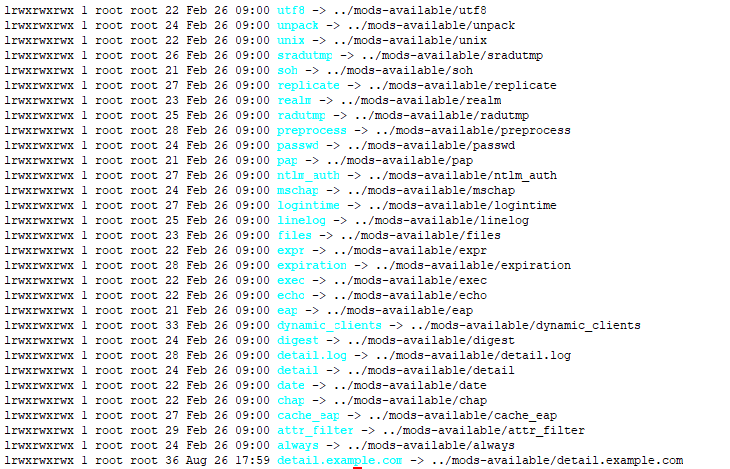
I believe I have added the relevant services to sites-enabled and mods-enabled ( attached are the screen shots ).
Stop wasting our time. The documentation says DO NOT POST HTE CONFIGURATION. The documentation also says DO NOT POST SCREEN SHOTS. Honestly, I have no idea why *anyone* would think it's a good idea to post images of text. Is cut & paste too difficult?
strace -Ff -tt freeradius -X 2>&1 | tee strace-freeradius.log
That's also a waste of your time. Why "strace?"
and when checking the log file I couldn't see any attempt to communicate with the home server specified in robust-proxy-accounting configuration file. The only entry I found for proxy is ( not sure what does this mean )
[pid 36713] 18:23:42.431513 write(1, "(2) Proxy-State = 0x3334\n", 27(2) Proxy-State = 0x3334
The Wiki has clear instructions for how to read and understand the debug output: http://wiki.freeradius.org/radiusd-X
Do I need to update default file to make robust proxy work? All other settings are default. Kindly guide me if I am missing some configuration.
I've spent 20 years writing TONS of documentation for the server. Pretty much everything you're trying to do is extensively documented. So yes, I *tried* to guide you by writing that documentation. Why are you ignoring the documentation? Alan DeKok.
Hi Alan, Thanks for the reply. I went through the documentation of robust proxy accounting again. Here is my problem: 1. When I start freeradius -X, I can see the virtual server are started. ( log snippet below ) =================== radiusd: #### Loading Virtual Servers #### server { # from file /etc/freeradius/radiusd.conf } # server server default { # from file /etc/freeradius/sites-enabled/default # Loading authenticate {...} # Loading authorize {...} Ignoring "sql" (see raddb/mods-available/README.rst) Ignoring "ldap" (see raddb/mods-available/README.rst) # Loading preacct {...} # Loading accounting {...} # Loading post-proxy {...} # Loading post-auth {...} } # server default server acct_detail.example.com { # from file /etc/freeradius/sites-enabled/robust-proxy-accounting # Loading accounting {...} } # server acct_detail.example.com server home.example.com { # from file /etc/freeradius/sites-enabled/robust-proxy-accounting # Loading accounting {...} # Loading post-proxy {...} } # server home.example.com server inner-tunnel { # from file /etc/freeradius/sites-enabled/inner-tunnel # Loading authenticate {...} # Loading authorize {...} # Loading session {...} # Loading post-proxy {...} # Loading post-auth {...} # Skipping contents of 'if' as it is always 'false' -- /etc/freeradius/sites-enabled/inner-tunnel:336 } # server inner-tunnel radiusd: #### Opening IP addresses and Ports #### listen { type = "auth" ipaddr = * port = 0 limit { ===================== Freeradius starts successfully and starts accepting the packets from radius client. ============= (0) Received Accounting-Request Id 97 from 172.30.248.99:44770 to 172.30.248.5:1813 length 363 (0) Acct-Session-Id = "5D66EC5E-D6CCD401" (0) Framed-IP-Address = 172.20.1.76 (0) Acct-Multi-Session-Id = "187c0b8a939c843835c4234f5d66ec5e0129" (0) Acct-Link-Count = 3 (0) Acct-Status-Type = Interim-Update (0) Acct-Authentic = RADIUS (0) User-Name = "AP274@haeata.school.nz" (0) NAS-IP-Address = 10.1.1.10 (0) NAS-Identifier = "18-7C-0B-8A-93-9C" (0) NAS-Port = 2 (0) Called-Station-Id = "18-7C-0B-8A-93-9C:N4L" (0) Calling-Station-Id = "84-38-35-C4-23-4F" (0) NAS-Port-Type = Wireless-802.11 (0) Connect-Info = "CONNECT 802.11a/n" (0) Event-Timestamp = "Aug 29 2019 09:25:26 NZST" (0) Class = 0x436f6e74656e7446696c7465722d536e7253747564656e74 (0) Ruckus-SSID = "N4L" (0) Ruckus-BSSID = 0x187c0b8a939c (0) Ruckus-VLAN-ID = 999 (0) Ruckus-SCG-CBlade-IP = 167837962 (0) Ruckus-SCG-DBlade-IP = 167838210 (0) Acct-Input-Packets = 86281 (0) Acct-Output-Packets = 145596 (0) Acct-Input-Octets = 6184672 (0) Acct-Output-Octets = 143477035 (0) Ruckus-Sta-RSSI = 28 (0) Acct-Session-Time = 1253 (0) Proxy-State = 0x323431 (0) # Executing section preacct from file /etc/freeradius/sites-enabled/default (0) preacct { (0) [preprocess] = ok (0) policy acct_unique { (0) update request { (0) &Tmp-String-9 := "ai:" (0) } # update request = noop (0) if (("%{hex:&Class}" =~ /^%{hex:&Tmp-String-9}/) && ("%{string:&Class}" =~ /^ai:([0-9a-f]{32})/i)) { (0) EXPAND %{hex:&Class} (0) --> 436f6e74656e7446696c7465722d536e7253747564656e74 (0) EXPAND ^%{hex:&Tmp-String-9} (0) --> ^61693a (0) if (("%{hex:&Class}" =~ /^%{hex:&Tmp-String-9}/) && ("%{string:&Class}" =~ /^ai:([0-9a-f]{32})/i)) -> FALSE (0) else { (0) update request { (0) EXPAND %{md5:%{User-Name},%{Acct-Session-ID},%{%{NAS-IPv6-Address}:-%{NAS-IP-Address}},%{NAS-Identifier},%{NAS-Port-ID},%{NAS-Port}} (0) --> 996c8986a23a1c489994ebe28d72f78e (0) &Acct-Unique-Session-Id := 996c8986a23a1c489994ebe28d72f78e (0) } # update request = noop (0) } # else = noop (0) } # policy acct_unique = noop (0) [files] = noop (0) } # preacct = ok (0) # Executing section accounting from file /etc/freeradius/sites-enabled/default (0) accounting { (0) detail: EXPAND /var/log/freeradius/radacct/%{%{Packet-Src-IP-Address}:-%{Packet-Src-IPv6-Address}}/detail-%Y%m%d (0) detail: --> /var/log/freeradius/radacct/172.30.248.99/detail-20190829 (0) detail: /var/log/freeradius/radacct/%{%{Packet-Src-IP-Address}:-%{Packet-Src-IPv6-Address}}/detail-%Y%m%d expands to /var/log/freeradius/radacct/172.30.248.99/detail-20190829 (0) detail: EXPAND %t (0) detail: --> Thu Aug 29 09:26:24 2019 (0) [detail] = ok (0) [unix] = noop (0) [exec] = noop (0) attr_filter.accounting_response: EXPAND %{User-Name} (0) attr_filter.accounting_response: --> AP274@haeata.school.nz (0) attr_filter.accounting_response: Matched entry DEFAULT at line 12 (0) [attr_filter.accounting_response] = updated (0) } # accounting = updated (0) Sent Accounting-Response Id 97 from 172.30.248.5:1813 to 172.30.248.99:44770 length 0 (0) Proxy-State = 0x323431 (0) Finished request (0) Cleaning up request packet ID 97 with timestamp +28 Ready to process requests =================================== It doesn't forward accounting packets to the homeservers specified in robust-proxy-accounting configuration. Neither I could see any logs that would provide some hint what is wrong with my configuration. Regards Prem On Tue, Aug 27, 2019 at 12:57 AM Alan DeKok <aland@deployingradius.com> wrote:
On Aug 26, 2019, at 2:52 AM, Prem Khanal <prem.khanal@n4l.co.nz> wrote:
Hi Alan,
Thanks for the reply. I have been trying to configure robust proxy
account
following the steps in
https://networkradius.com/doc/3.0.10/raddb/sites-available/robust-proxy-acco...
. I have only changed the IP and secret of a home home server to test if the configuration is working. But the proxy is not happening. Means the accounting packets are not forwarded to the home server.
And what does the debug output say?
This isn't difficult.
Then I tried
nmap -sU -p 1813 <home server IP>
which returned a success
Which is entirely useless. And, a waste of your time.
If you're going to debug a RADIUS server, then debug the *RADIUS SERVER*. Don't run random other tools.
The documentation is EXTREMELY CLEAR on how to debug a FreeRADIUS configuration. NOTHING in the documentation says to run "nmap".
I believe I have added the relevant services to sites-enabled and mods-enabled ( attached are the screen shots ).
Stop wasting our time.
The documentation says DO NOT POST HTE CONFIGURATION. The documentation also says DO NOT POST SCREEN SHOTS.
Honestly, I have no idea why *anyone* would think it's a good idea to post images of text. Is cut & paste too difficult?
strace -Ff -tt freeradius -X 2>&1 | tee strace-freeradius.log
That's also a waste of your time. Why "strace?"
and when checking the log file I couldn't see any attempt to communicate with the home server specified in robust-proxy-accounting configuration file. The only entry I found for proxy is ( not sure what does this mean )
[pid 36713] 18:23:42.431513 write(1, "(2) Proxy-State = 0x3334\n", 27(2) Proxy-State = 0x3334
The Wiki has clear instructions for how to read and understand the debug output:
http://wiki.freeradius.org/radiusd-X
Do I need to update default file to make robust proxy work? All other settings are default. Kindly guide me if I am missing some configuration.
I've spent 20 years writing TONS of documentation for the server. Pretty much everything you're trying to do is extensively documented.
So yes, I *tried* to guide you by writing that documentation. Why are you ignoring the documentation?
Alan DeKok.
- List info/subscribe/unsubscribe? See http://www.freeradius.org/list/users.html
-- Cheers Prem
On Aug 28, 2019, at 5:29 PM, Prem Khanal <prem.khanal@n4l.co.nz> wrote:
Thanks for the reply. I went through the documentation of robust proxy accounting again. Here is my problem:
1. When I start freeradius -X, I can see the virtual server are started. ( log snippet below ) ... It doesn't forward accounting packets to the homeservers specified in robust-proxy-accounting configuration. Neither I could see any logs that would provide some hint what is wrong with my configuration.
The server doesn't magically know to forward packets. You have to *tell* it to forward packets. The default configuration does this. You've edited it so that proxying doesn't happen. Why? The sites-enabled/default file has a "preacct" section. You've deleted the "suffix" module from that section. Put it back. You also need to configure that file to write packets to the detail file in the "Post-Proxy-Type Fail-Accounting" section. See the end of that file for details: Post-Proxy-Type Fail-Accounting { detail.example.com } And you MUST use the *same* detail file which is read by the "robust-proxy-accounting" virtual server. This will likely mean using mods-available/detail.example.com. Again, you will likely have to edit it for your local site. Alan DeKok.
participants (2)
-
 Alan DeKok
 -
 Prem Khanal