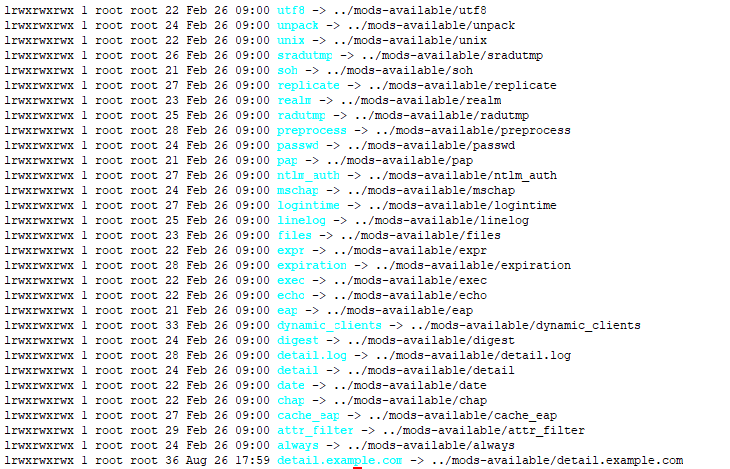
Hi Alan, Thanks for the reply. I have been trying to configure robust proxy account following the steps in https://networkradius.com/doc/3.0.10/raddb/sites-available/robust-proxy-acco... . I have only changed the IP and secret of a home home server to test if the configuration is working. But the proxy is not happening. Means the accounting packets are not forwarded to the home server. Then I tried nmap -sU -p 1813 <home server IP> which returned a success =============================================== Starting Nmap 7.60 ( https://nmap.org ) at 2019-08-26 18:34 NZST Nmap scan report for 14.1.55.78.host.layer2.co.nz (14.1.55.78) Host is up (0.010s latency). PORT STATE SERVICE 1813/udp open|filtered radacct Nmap done: 1 IP address (1 host up) scanned in 0.45 seconds ================================================= I believe I have added the relevant services to sites-enabled and mods-enabled ( attached are the screen shots ). [image: image.png] [image: image.png] I have tried running freeradius in an extended debug mode by using strace -Ff -tt freeradius -X 2>&1 | tee strace-freeradius.log and when checking the log file I couldn't see any attempt to communicate with the home server specified in robust-proxy-accounting configuration file. The only entry I found for proxy is ( not sure what does this mean ) [pid 36713] 18:23:42.431513 write(1, "(2) Proxy-State = 0x3334\n", 27(2) Proxy-State = 0x3334 Do I need to update default file to make robust proxy work? All other settings are default. Kindly guide me if I am missing some configuration. Regards Prem On Thu, Aug 22, 2019 at 7:02 AM Alan DeKok <aland@deployingradius.com> wrote:
On Aug 20, 2019, at 8:47 PM, Prem Khanal <prem.khanal@n4l.co.nz> wrote:
I am running freeradius 3.0.16 on ubuntu 18.04 as a proxy server.
You may want to upgrade to 3.0.19. Use the packages at http://packages.networkradius.com
The setup is as such that Device enrollment management system forwards radius accounting packets to radius proxy and then radius proxy server forwards the accounting packets to one or multiple Fortigates accepting radius accounting packets.
OK.
The issue I am having is when one of the Fortigate is not able to accept packets ( network level issue or firewall level issue ), the proxy server starts creating detail and detail.work files and as soon as the Fortigate interface is up it (Radius proxy) tries to push the backlog from these files.
That's standard.
The problem is, if the interface has been down for couple of hours the backlog is so huge ( and new requests are frequently coming ) that it can not redirect current traffic to specific firewall.
What do you mean by "cannot redirect current traffic"?
But it's pretty bad when critical systems are offline for hours. We recommend keeping critical systems up, so that issues like this don't come up.
If I delete the detail and detail.work file and restart the free radius server then it starts functioning normally. I believe I am missing some configuration. Kindly guide me what could be the workaround for this.
Workaround for...
I am looking for following solution:
1. Is there any way to setup a notification as soon as freeradius proxy marks a fortigate as Zombie?
See raddb/trigger.conf. You can send an SNMP trigger, or do anything else.
2. The proxy just stops functioning ( even though it is trying to process detail and detail.work files in the background ) i.e. stops forwarding accounting packets to specific firewalls even after the communication issue is resolved. How can we make it more resilient?
Ah. That's a clearer description of the issue.
FreeRADIUS shouldn't just stop proxying.
====================Proxy.conf=================
We don't need to see the configuration files.
============================================== ==========copy-acct-to-home-server========
Hmm... if you're using that virtual server, then that may be the problem.
What you may be doing is *always* writing accounting packets to the detail file. Then, reading the detail file, and sending those packets upstream.
As you noticed, if the detail file gets huge, then the delay for proxied packet also gets huge. The solution is to use the "robust-proxy-accounting" virtual server.
That virtual server will proxy packets, and then *only* write them to the detail file if the home server is down. So once the home server comes back up, new packets will be sent immediately to the home server.
Alan DeKok.
- List info/subscribe/unsubscribe? See http://www.freeradius.org/list/users.html
-- Cheers Prem